> For the complete documentation index, see [llms.txt](https://docs.cloudeka.ai/llms.txt). Markdown versions of documentation pages are available by appending `.md` to page URLs; this page is available as [Markdown](https://docs.cloudeka.ai/deka-gpu-documentations/panduan-untuk-enterprise/cloudeka-api-list/command-reference/cldkctl-flexi/security/create.md).

# create

Create a new flexi security in your project. This command allows you to define and create a new flexi security.

## Usage

```
cldkctl flexi security create [flags]
```

## Aliases

```
create, add, new
```

## Steps

Follow the steps below to run and view the result of this command:

#### Interactive Mode

1. Run the following command in your terminal:

```
cldkctl flexi security create -i 
```

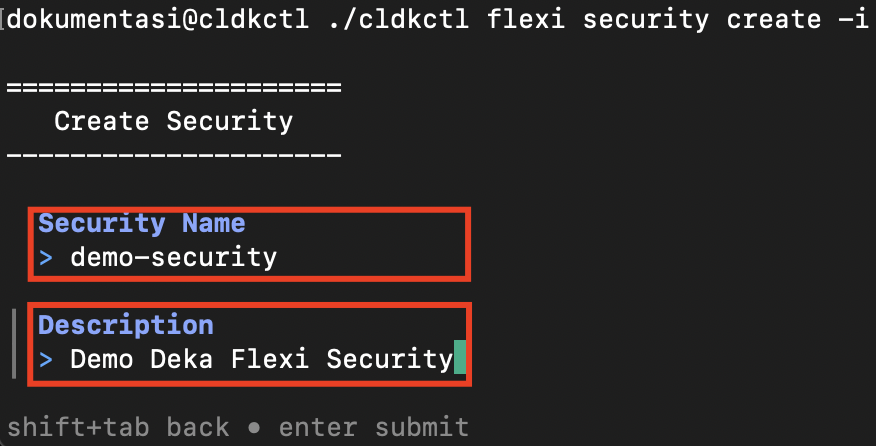
2. Enter the **security name** and **description**.

<figure><img src="https://753761090-files.gitbook.io/~/files/v0/b/gitbook-x-prod.appspot.com/o/spaces%2FtAYQyBIz2BclZ3ZHHlS4%2Fuploads%2Fgit-blob-26ad663dc086a668cecec0e4b59002ac5b8dca02%2Fimage.png?alt=media" alt=""><figcaption></figcaption></figure>

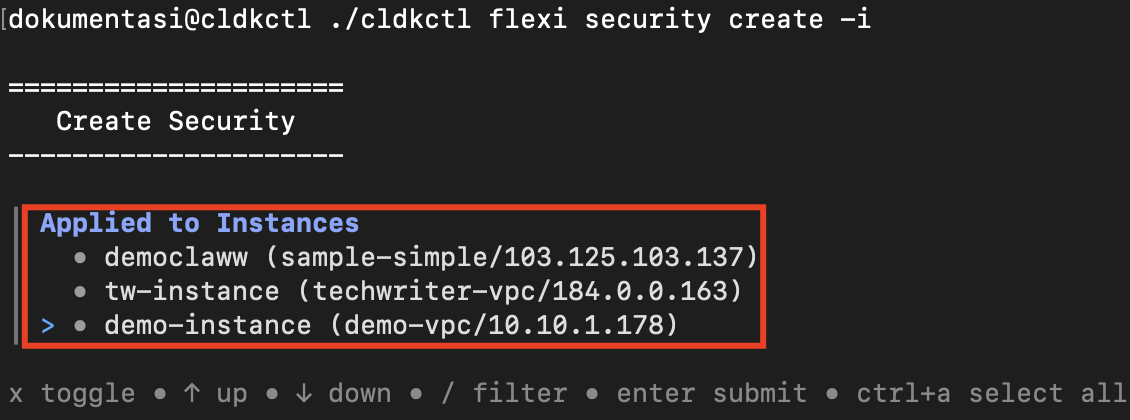
3. Select the instances to which the security group will be applied.

<figure><img src="https://753761090-files.gitbook.io/~/files/v0/b/gitbook-x-prod.appspot.com/o/spaces%2FtAYQyBIz2BclZ3ZHHlS4%2Fuploads%2Fgit-blob-9bf89ac77621933f31ed5dcf84d612729e2cd15c%2Fimage.png?alt=media" alt=""><figcaption></figcaption></figure>

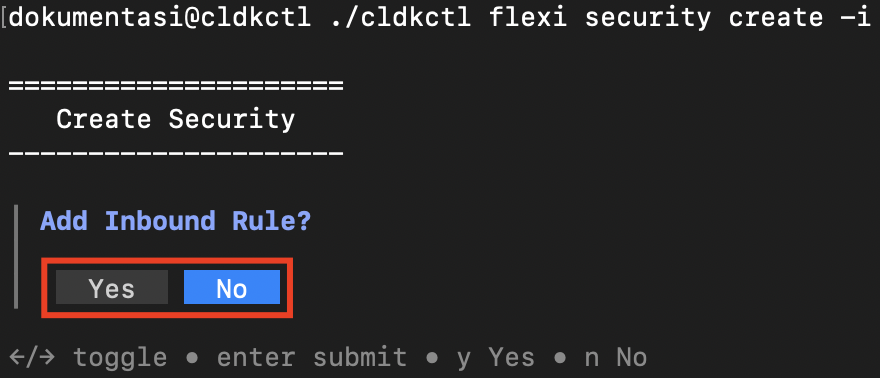
4. Choose whether to **add an inbound rule**.

<figure><img src="https://753761090-files.gitbook.io/~/files/v0/b/gitbook-x-prod.appspot.com/o/spaces%2FtAYQyBIz2BclZ3ZHHlS4%2Fuploads%2Fgit-blob-4b2bf7768bb4be22ebb5334b6430c07947765974%2Fimage.png?alt=media" alt=""><figcaption></figcaption></figure>

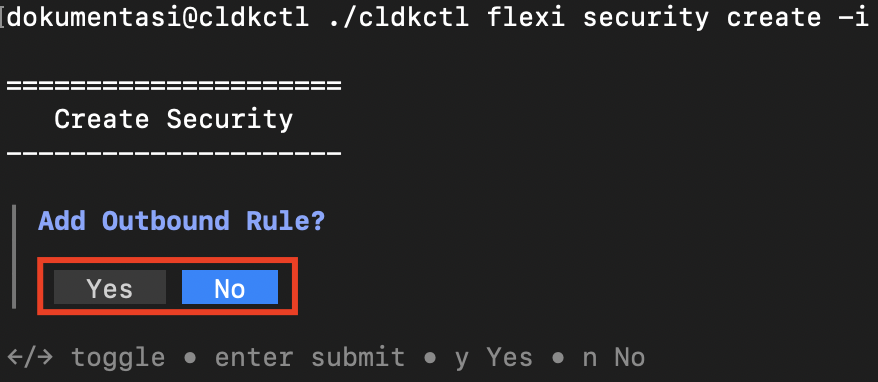
5. Choose whether to **add an outbound rule**.

<figure><img src="https://753761090-files.gitbook.io/~/files/v0/b/gitbook-x-prod.appspot.com/o/spaces%2FtAYQyBIz2BclZ3ZHHlS4%2Fuploads%2Fgit-blob-a5f135386c89f6a6bcd6dca7b17460e853a27f94%2Fimage.png?alt=media" alt=""><figcaption></figcaption></figure>

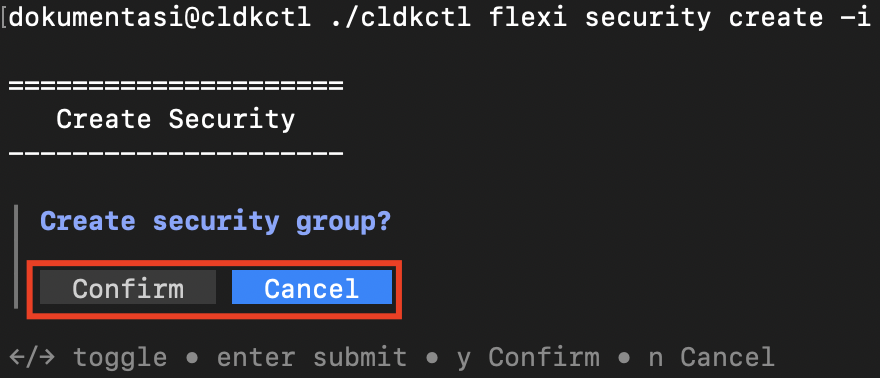
6. Confirm the security group creation.

<figure><img src="https://753761090-files.gitbook.io/~/files/v0/b/gitbook-x-prod.appspot.com/o/spaces%2FtAYQyBIz2BclZ3ZHHlS4%2Fuploads%2Fgit-blob-1866759c0d993989b11f63ce8744e3cad5488431%2Fimage.png?alt=media" alt=""><figcaption></figcaption></figure>

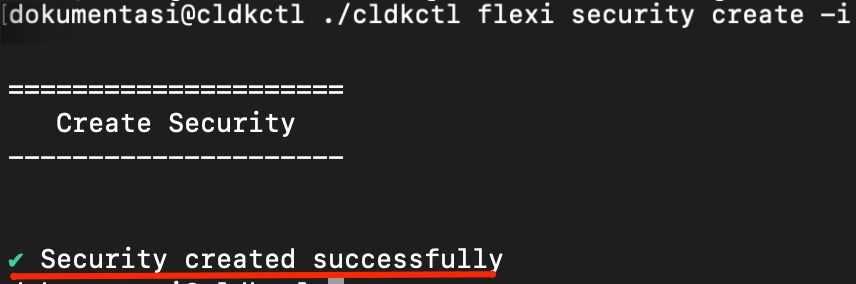
7. Once completed successfully, the terminal displays the success message.

<figure><img src="https://753761090-files.gitbook.io/~/files/v0/b/gitbook-x-prod.appspot.com/o/spaces%2FtAYQyBIz2BclZ3ZHHlS4%2Fuploads%2Fgit-blob-15b35e10d039902055d42223db1e6f301663e5ba%2Fimage.jpg?alt=media" alt=""><figcaption></figcaption></figure>

#### Non-Interactive Mode

1. Provide all required values using command flags.
2. Add `--auto-confirm` or `-y` to skip confirmation prompts in non-interactive mode.
3. Run the command in your terminal.
4. Once completed successfully, the terminal displays the success message.

<figure><img src="https://753761090-files.gitbook.io/~/files/v0/b/gitbook-x-prod.appspot.com/o/spaces%2FtAYQyBIz2BclZ3ZHHlS4%2Fuploads%2Fgit-blob-c755dcc13dcdab1900545d49cb2800291bb48431%2Fimage%20(1).jpg?alt=media" alt=""><figcaption></figcaption></figure>

## Flags

{% hint style="info" %}
This command supports [global flags](/deka-gpu-documentations/panduan-untuk-enterprise/cloudeka-api-list/global-flags.md). Refer to the Global Flags section for details
{% endhint %}

| Flag                      | Shorthand | Default   | Description                                                                  |
| ------------------------- | --------- | --------- | ---------------------------------------------------------------------------- |
| --auto-confirm            | -y        | false     | Skip confirmation prompt in non-interactive mode                             |
| --description string      |           |           | Security group description                                                   |
| --help                    | -h        |           | Help for the create command.                                                 |
| --interactive             | -i        | false     | Force interactive TUI mode                                                   |
| --name string             | -n        |           | Security group name (required in non-interactive mode)                       |
| --port-ids string         |           |           | Comma-separated instance port IDs to apply                                   |
| --rule-description string |           |           | Rule description                                                             |
| --rule-direction string   |           |           | Rule direction: ingress or egress                                            |
| --rule-ethertype string   |           | IPv4      | Rule ethertype: IPv4 or IPv6                                                 |
| --rule-port-max string    |           |           | Rule port range max                                                          |
| --rule-port-min string    |           |           | Rule port range min                                                          |
| --rule-sources string     |           | 0.0.0.0/0 | Rule sources (CIDR)                                                          |
| --rule-type string        |           | SSH       | Rule type: SSH, HTTP, HTTPS, Custom TCP Rule, Custom UDP Rule, All ICMP Rule |