> For the complete documentation index, see [llms.txt](https://docs.cloudeka.ai/llms.txt). Markdown versions of documentation pages are available by appending `.md` to page URLs; this page is available as [Markdown](https://docs.cloudeka.ai/deka-gpu-documentations/panduan-untuk-enterprise/deka-box/manage-access-key.md).

# Mengelola Kunci Akses

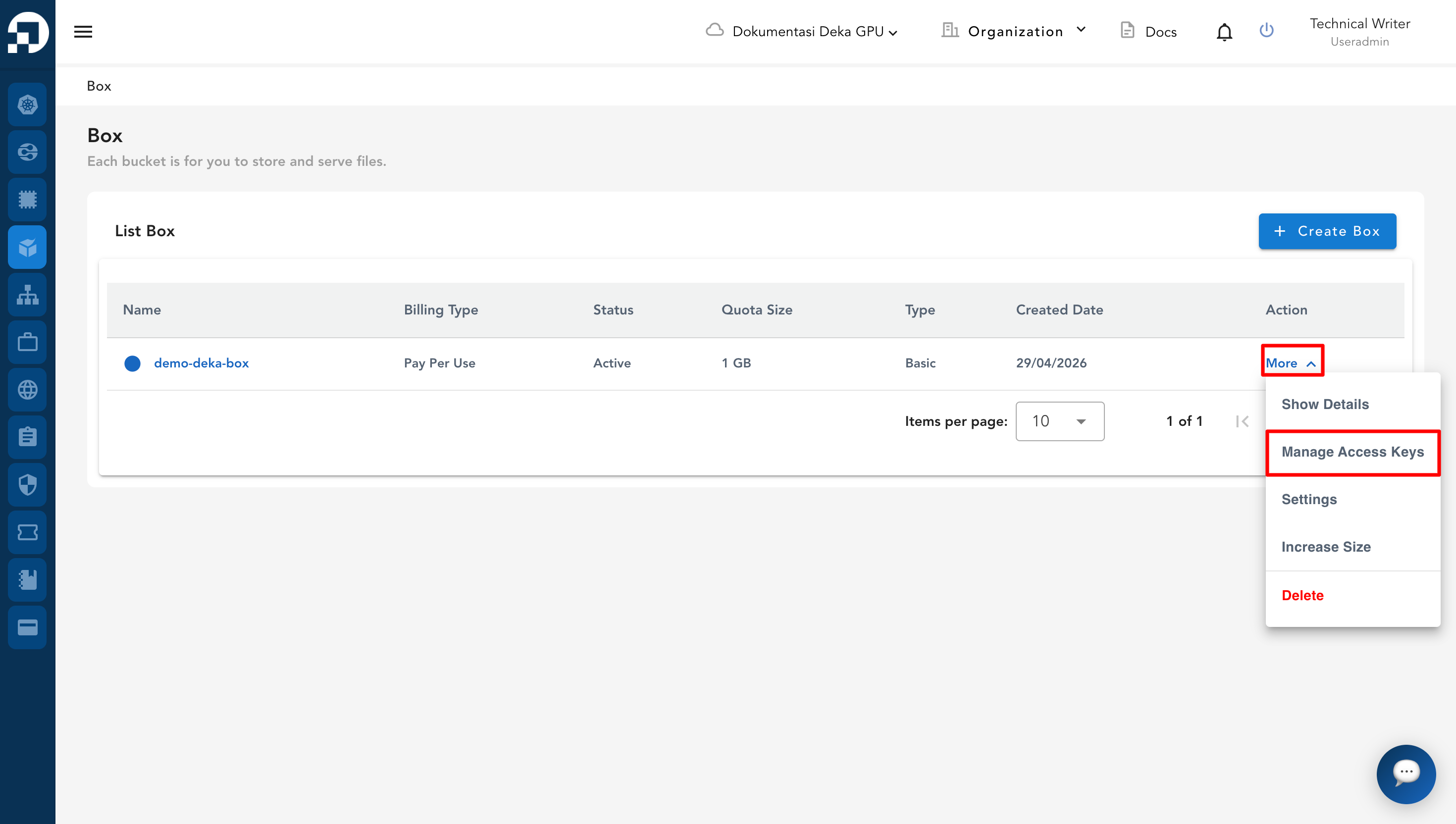
***Object Storage Access Key*** adalah identitas unik untuk mengakses objek dalam *bucket*. Kunci akses menghasilkan ***Key ID*** dan ***Secret Key***. Buka halaman Deka Box untuk melihat daftar ***object storage***. Pilih *bucket* yang ingin dikelola. Pada kolom ***Action***, klik ***More***, lalu pilih ***Manage Access Keys***.

<figure><img src="https://753761090-files.gitbook.io/~/files/v0/b/gitbook-x-prod.appspot.com/o/spaces%2FtAYQyBIz2BclZ3ZHHlS4%2Fuploads%2Fgit-blob-15394506ef5491e1a93ede756fb1aec1736910fa%2Fimage.png?alt=media" alt=""><figcaption></figcaption></figure>

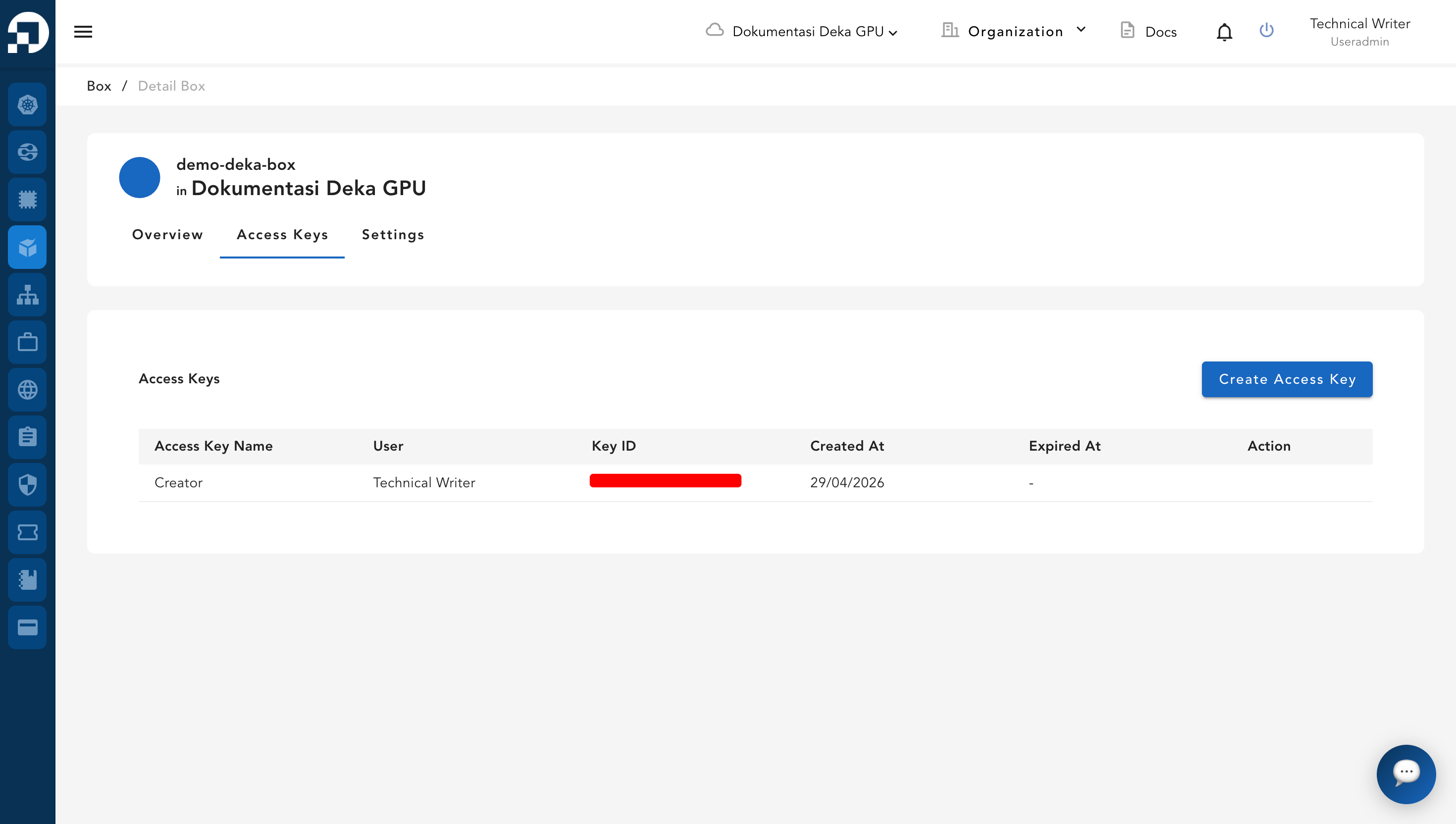
Halaman ***Manage*** ***Access Keys*** menampilkan daftar kunci akses.

<figure><img src="https://753761090-files.gitbook.io/~/files/v0/b/gitbook-x-prod.appspot.com/o/spaces%2FtAYQyBIz2BclZ3ZHHlS4%2Fuploads%2Fgit-blob-eca0147fa4f36b6a44d3658cc7ae490df70c85b2%2Fimage.png?alt=media" alt=""><figcaption></figcaption></figure>

<table><thead><tr><th width="224">Kolom</th><th>Deskripsi</th></tr></thead><tbody><tr><td><em>Access Key Name</em></td><td>Nama kunci akses.</td></tr><tr><td><em>User</em></td><td>Pengguna yang memiliki kunci akses.</td></tr><tr><td><em>Key ID</em></td><td><em>Key ID</em> untuk mengakses <em>bucket</em>.</td></tr><tr><td><em>Created At</em></td><td>Tanggal dan waktu saat kunci akses dibuat.</td></tr><tr><td><em>Expired At</em></td><td>Tanggal dan waktu saat kunci akses kedaluwarsa.</td></tr><tr><td><em>Action</em></td><td>Tindakan yang tersedia untuk mengelola kunci akses.</td></tr></tbody></table>

Anda juga dapat menambahkan kunci akses baru dengan mengikuti langkah pada [**Menambahkan Access Key**](/deka-gpu-documentations/panduan-untuk-enterprise/deka-box/manage-access-key/add-access-key.md). Untuk menghapus kunci akses yang tidak digunakan, ikuti langkah pada[ ](/deka-gpu-documentations/panduan-untuk-enterprise/deka-box/manage-access-key/delete-access-key.md)[**Menghapus Access Key**.](/deka-gpu-documentations/panduan-untuk-enterprise/deka-box/manage-access-key/delete-access-key.md)
