> For the complete documentation index, see [llms.txt](https://docs.cloudeka.ai/llms.txt). Markdown versions of documentation pages are available by appending `.md` to page URLs; this page is available as [Markdown](https://docs.cloudeka.ai/deka-gpu-documentations/panduan-untuk-enterprise/deka-flexi/deka-vpn/openvpn-configuration/create-openvpn.md).

# Membuat OpenVPN

Untuk membuat OpenVPN, isi kolom berikut:

<table><thead><tr><th width="275">Kolom</th><th>Deskripsi</th></tr></thead><tbody><tr><td><strong>Username</strong></td><td>Nama pengguna untuk mengidentifikasi pengguna saat terhubung ke server OpenVPN.</td></tr><tr><td><strong>Password</strong></td><td>Kata sandi yang digunakan pengguna untuk autentikasi saat terhubung ke server OpenVPN.</td></tr><tr><td><strong>Confirm Password</strong></td><td>Konfirmasi kata sandi yang telah dimasukkan.</td></tr><tr><td><strong>Tunnel Settings - Protocol</strong></td><td>Protokol yang digunakan pada koneksi VPN. Saat ini, hanya protokol UDP pada IPv4 yang tersedia.</td></tr><tr><td><strong>Tunnel Settings - Ports</strong></td><td>Nomor port yang digunakan server OpenVPN terisi otomatis dengan port 1194.</td></tr><tr><td><strong>Tunnel Settings - OpenVPN Client Network</strong></td><td>Jaringan virtual yang digunakan pengguna saat terhubung ke server OpenVPN.</td></tr></tbody></table>

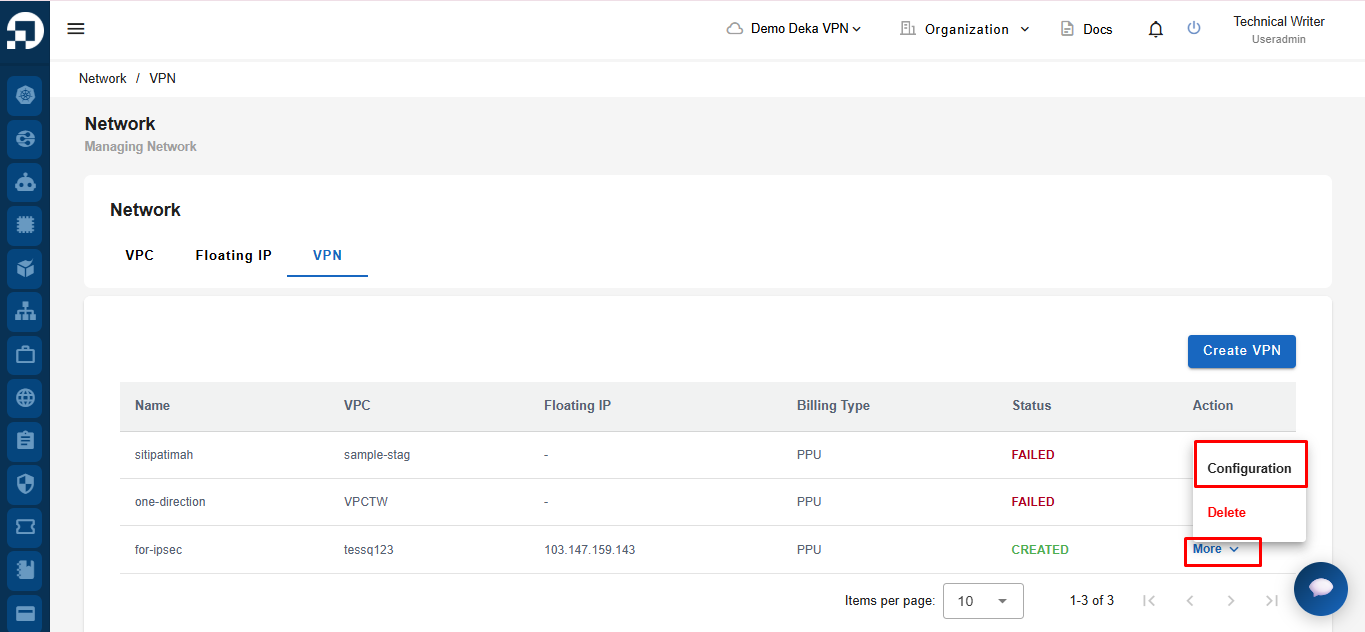
Fitur **Create OpenVPN** digunakan untuk membuat pengguna OpenVPN baru pada VPN yang dipilih. Pada halaman **VPN List**, klik **More** di kolom **Action**, lalu pilih **Configuration**.

<figure><img src="https://753761090-files.gitbook.io/~/files/v0/b/gitbook-x-prod.appspot.com/o/spaces%2FtAYQyBIz2BclZ3ZHHlS4%2Fuploads%2Fgit-blob-a1264290f1a9c1ef0f05b259a23c74cef46cbcfc%2Fimage.png?alt=media" alt=""><figcaption></figcaption></figure>

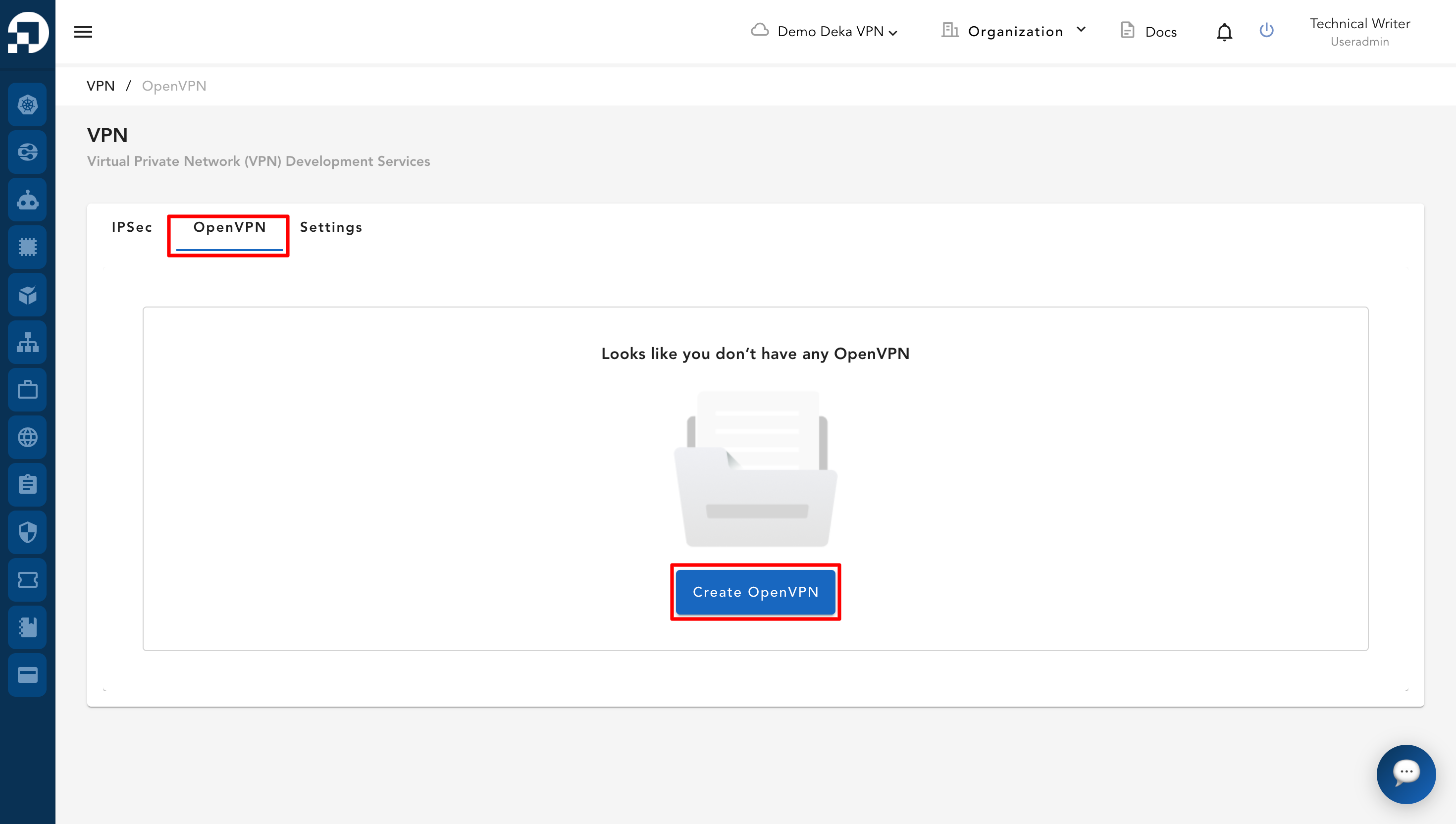
Pada tab **OpenVPN**, klik tombol **Create OpenVPN**.

<figure><img src="https://753761090-files.gitbook.io/~/files/v0/b/gitbook-x-prod.appspot.com/o/spaces%2FtAYQyBIz2BclZ3ZHHlS4%2Fuploads%2Fgit-blob-77a4afc75bf64fd666ace2a70af7ace97d4eed72%2Fimage.png?alt=media" alt=""><figcaption></figcaption></figure>

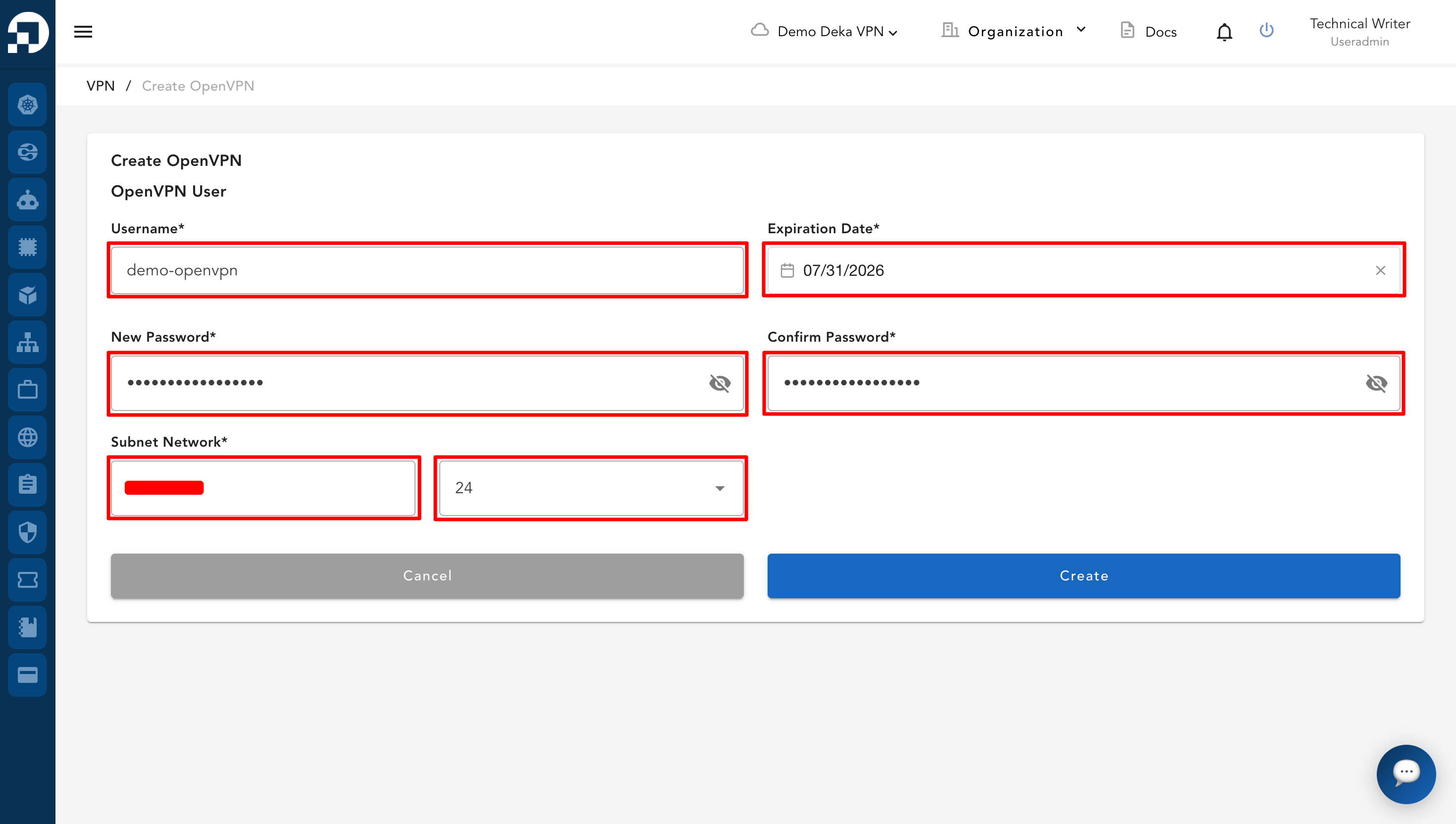
Halaman **Create OpenVPN** akan ditampilkan. Tabel berikut menjelaskan kolom yang diperlukan untuk membuat pengguna OpenVPN.

<table><thead><tr><th width="204">Kolom</th><th>Deskripsi</th></tr></thead><tbody><tr><td><strong>Username</strong></td><td>Menentukan nama pengguna OpenVPN.</td></tr><tr><td><strong>Expiration Date</strong></td><td>Menentukan tanggal kedaluwarsa pengguna OpenVPN.</td></tr><tr><td><strong>New Password</strong></td><td>Menentukan kata sandi pengguna OpenVPN.</td></tr><tr><td><strong>Confirm Password</strong></td><td>Mengonfirmasi kata sandi yang dimasukkan pada kolom <strong>New Password</strong>.</td></tr><tr><td><strong>Subnet Network</strong></td><td>Menentukan jaringan subnet untuk pengguna OpenVPN.</td></tr><tr><td><strong>Network Size</strong></td><td>Menentukan ukuran jaringan untuk jaringan subnet yang dipilih.</td></tr></tbody></table>

Lengkapi informasi yang diperlukan, termasuk kolom **Username**, **Expiration Date**, **New Password**, **Confirm Password**, **Subnet Network**, dan **Network Size**.

<figure><img src="https://753761090-files.gitbook.io/~/files/v0/b/gitbook-x-prod.appspot.com/o/spaces%2FtAYQyBIz2BclZ3ZHHlS4%2Fuploads%2Fgit-blob-20efb5defa2125b94e71278d767240e943d115a2%2Fimage.png?alt=media" alt=""><figcaption></figcaption></figure>

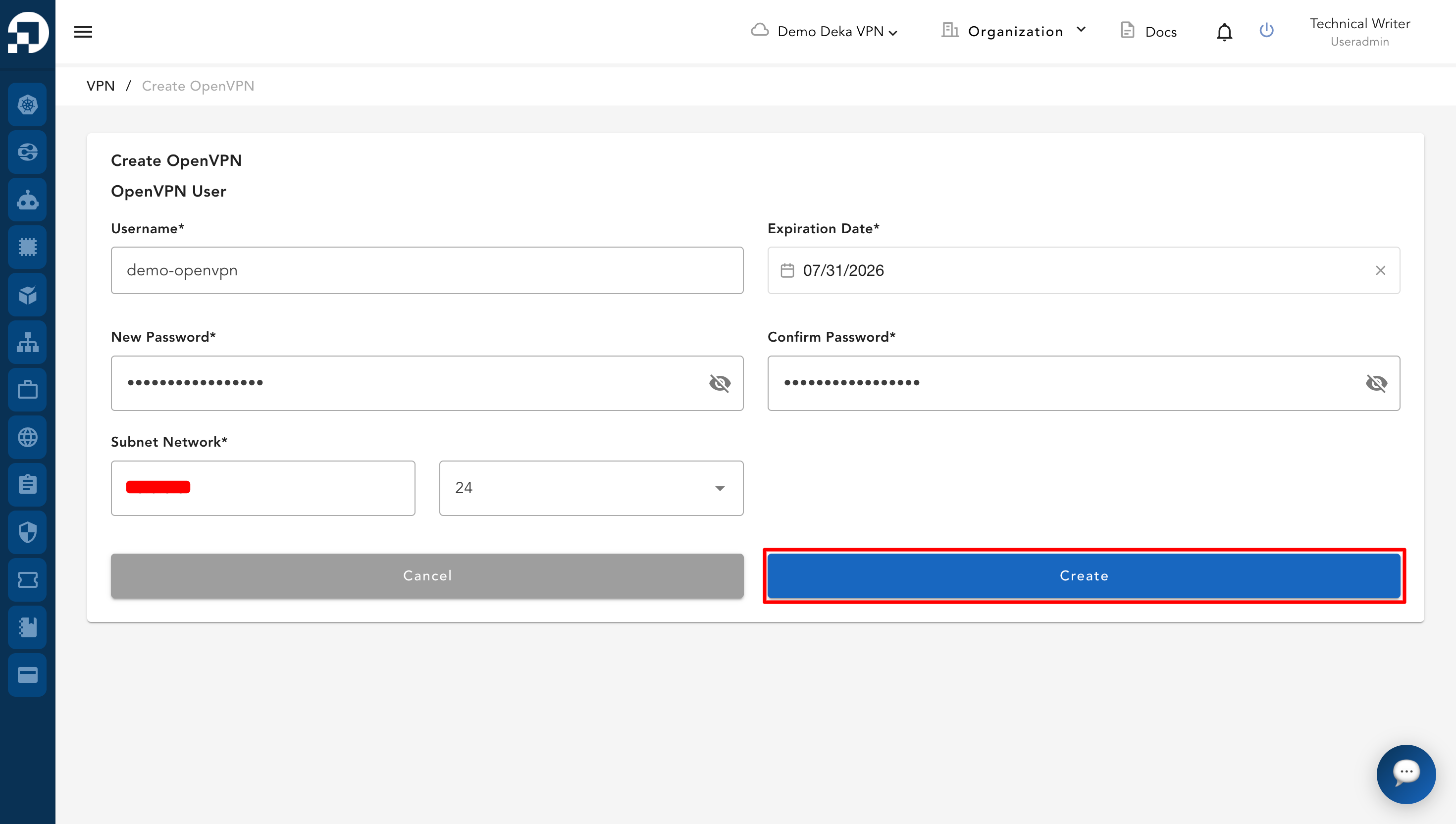
Setelah semua kolom yang diperlukan diisi, klik tombol **Create**.

<figure><img src="https://753761090-files.gitbook.io/~/files/v0/b/gitbook-x-prod.appspot.com/o/spaces%2FtAYQyBIz2BclZ3ZHHlS4%2Fuploads%2Fgit-blob-e931cf780ebe3ebd92344c645cb97c416c4d3c41%2Fimage.png?alt=media" alt=""><figcaption></figcaption></figure>

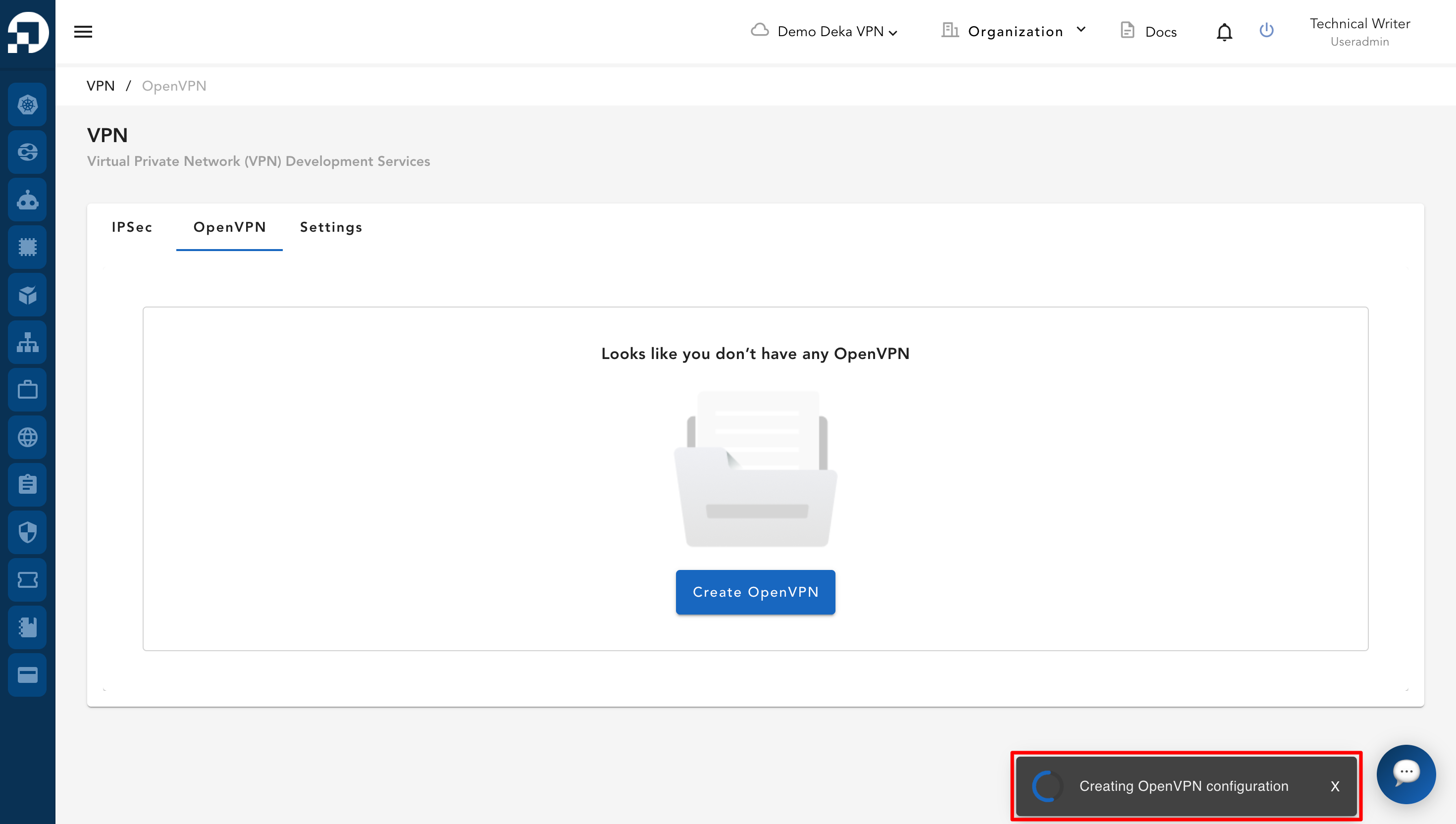
Sistem menampilkan notifikasi bahwa konfigurasi OpenVPN sedang dibuat.

<figure><img src="https://753761090-files.gitbook.io/~/files/v0/b/gitbook-x-prod.appspot.com/o/spaces%2FtAYQyBIz2BclZ3ZHHlS4%2Fuploads%2Fgit-blob-9b1b7e7c32be8ea0df7f9ecf3b94cdda487a0106%2Fimage.png?alt=media" alt=""><figcaption></figcaption></figure>

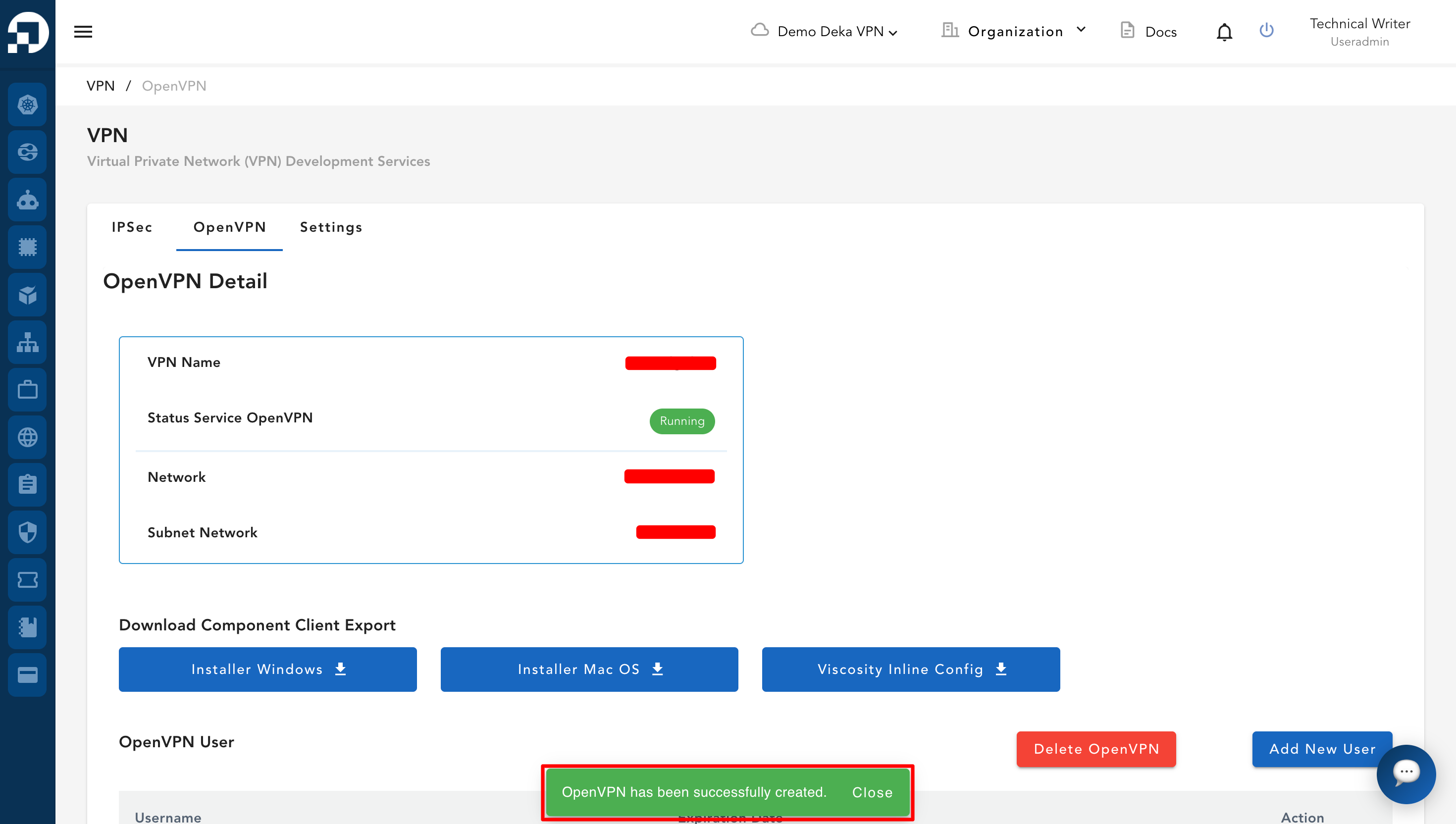
Jika konfigurasi OpenVPN berhasil dibuat, sistem mengarahkan Anda ke halaman **OpenVPN Detail**. Notifikasi akan muncul bahwa OpenVPN berhasil dibuat.

<figure><img src="https://753761090-files.gitbook.io/~/files/v0/b/gitbook-x-prod.appspot.com/o/spaces%2FtAYQyBIz2BclZ3ZHHlS4%2Fuploads%2Fgit-blob-80d29353af52fc3639f55260f3416a785c5ac623%2Fimage.png?alt=media" alt=""><figcaption></figcaption></figure>