> For the complete documentation index, see [llms.txt](https://docs.cloudeka.ai/llms.txt). Markdown versions of documentation pages are available by appending `.md` to page URLs; this page is available as [Markdown](https://docs.cloudeka.ai/deka-gpu-documentations/panduan-untuk-enterprise/deka-gpu/deka-gpu-deka-vpn/configuration-deka-vpn-ipsec/ipsec-connection.md).

# Koneksi IPSec

Bagian *IPSec Connection* menampilkan detail koneksi VPN yang telah dibuat. Detailnya meliputi informasi endpoint lokal dan remote (*ID* dan *Host*) serta peran yang ditetapkan. Perluas *Child SA Entries* untuk melihat informasi tambahan, seperti detail subnet dan statistik trafik, termasuk byte serta paket masuk/keluar. Ikuti langkah berikut untuk melihat detail *IPSec Connection*:

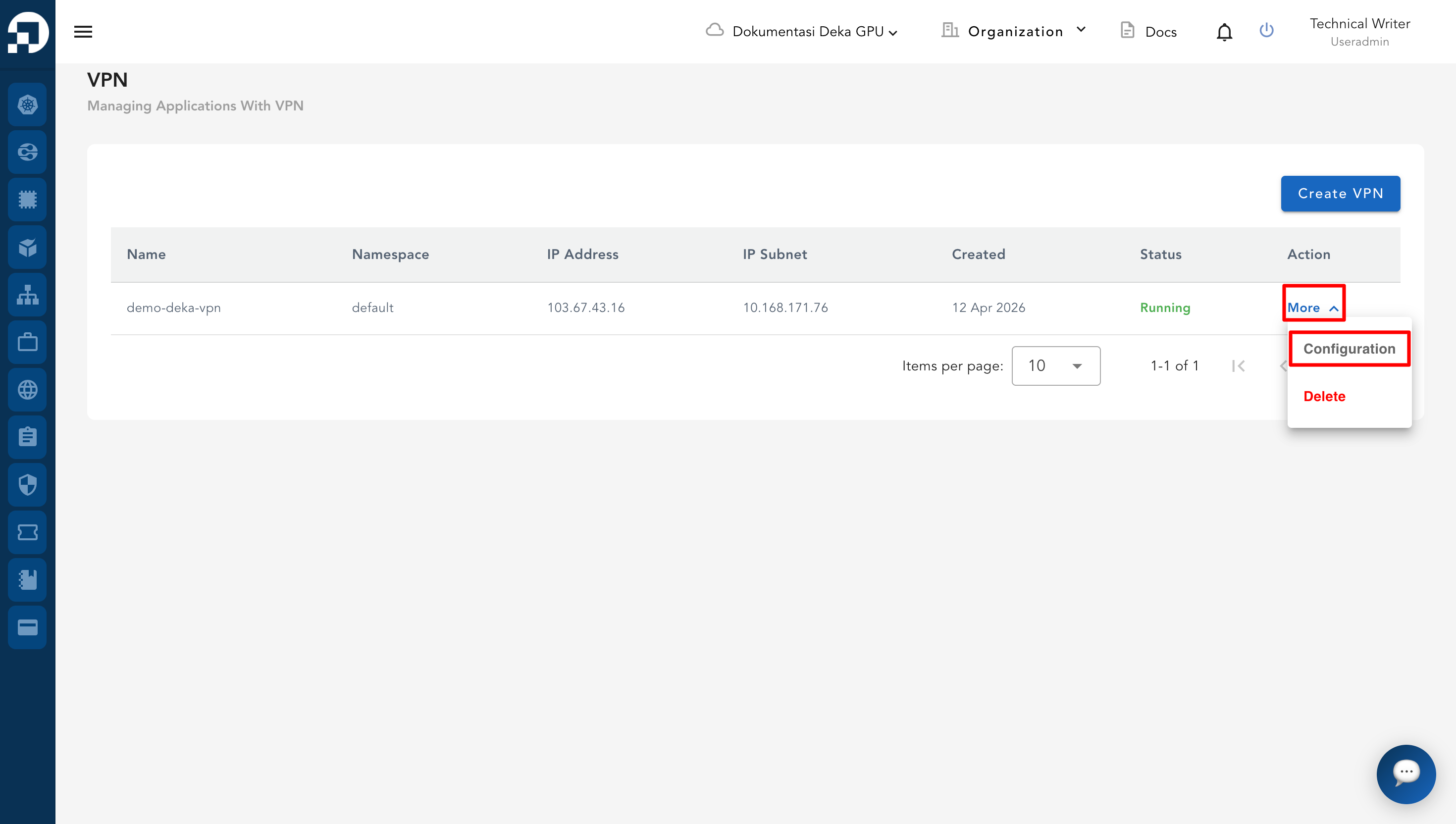
Dari ***VPN List Table***, pilih salah satu entri VPN. Klik ***More***, lalu ***Configuration***.

<figure><img src="https://753761090-files.gitbook.io/~/files/v0/b/gitbook-x-prod.appspot.com/o/spaces%2FtAYQyBIz2BclZ3ZHHlS4%2Fuploads%2Fgit-blob-e639cac236d4816ebcbee233b1c175485db1a131%2Fimage.png?alt=media" alt=""><figcaption></figcaption></figure>

Pada halaman ***IPSec***, gulir ke bagian ***IPSec Connection***. Bagian ini menampilkan:

<table><thead><tr><th width="110.66668701171875">Kolom</th><th>Deskripsi</th></tr></thead><tbody><tr><td><em><strong>Local</strong></em></td><td>Menampilkan <em>ID</em> dan <em>Host</em> (alamat IP + port) endpoint lokal.</td></tr><tr><td><em><strong>Remote</strong></em></td><td>Menampilkan <em>ID</em> dan <em>Host</em> (alamat IP + port) endpoint remote.</td></tr><tr><td><em><strong>Role</strong></em></td><td>Menampilkan peran koneksi, misalnya <em>Responder</em>.</td></tr></tbody></table>

Untuk menampilkan detail tambahan, klik tombol ***Show Child SA Entries***.

<figure><img src="https://753761090-files.gitbook.io/~/files/v0/b/gitbook-x-prod.appspot.com/o/spaces%2FtAYQyBIz2BclZ3ZHHlS4%2Fuploads%2Fgit-blob-e9fa138e532b43733a59e8f0fc4c73f042aba28a%2Fimage%20(12).png?alt=media" alt=""><figcaption></figcaption></figure>

Sistem kemudian menampilkan:

<figure><img src="https://753761090-files.gitbook.io/~/files/v0/b/gitbook-x-prod.appspot.com/o/spaces%2FtAYQyBIz2BclZ3ZHHlS4%2Fuploads%2Fgit-blob-5ff82f48c89920e3cac200bd1965459f0e5b9165%2Fimage%20(13).png?alt=media" alt=""><figcaption></figcaption></figure>

<table><thead><tr><th width="169.00006103515625">Kolom</th><th>Deskripsi</th></tr></thead><tbody><tr><td><em><strong>Local Subnet</strong></em></td><td>Menampilkan informasi subnet lokal dari koneksi IPSec.</td></tr><tr><td><em><strong>Remote Subnet</strong></em></td><td>Menampilkan informasi subnet remote dari koneksi IPSec.</td></tr><tr><td><em><strong>Stats</strong></em></td><td>Menampilkan statistik trafik, termasuk <em><strong>Bytes in/out</strong></em> dan <em><strong>Packets in/out</strong></em>.</td></tr></tbody></table>
