> For the complete documentation index, see [llms.txt](https://docs.cloudeka.ai/llms.txt). Markdown versions of documentation pages are available by appending `.md` to page URLs; this page is available as [Markdown](https://docs.cloudeka.ai/deka-gpu-documentations/panduan-untuk-enterprise/deka-llm/detail-deka-llm/alert-tab/create-a-new-alert.md).

# Buat Alert Baru

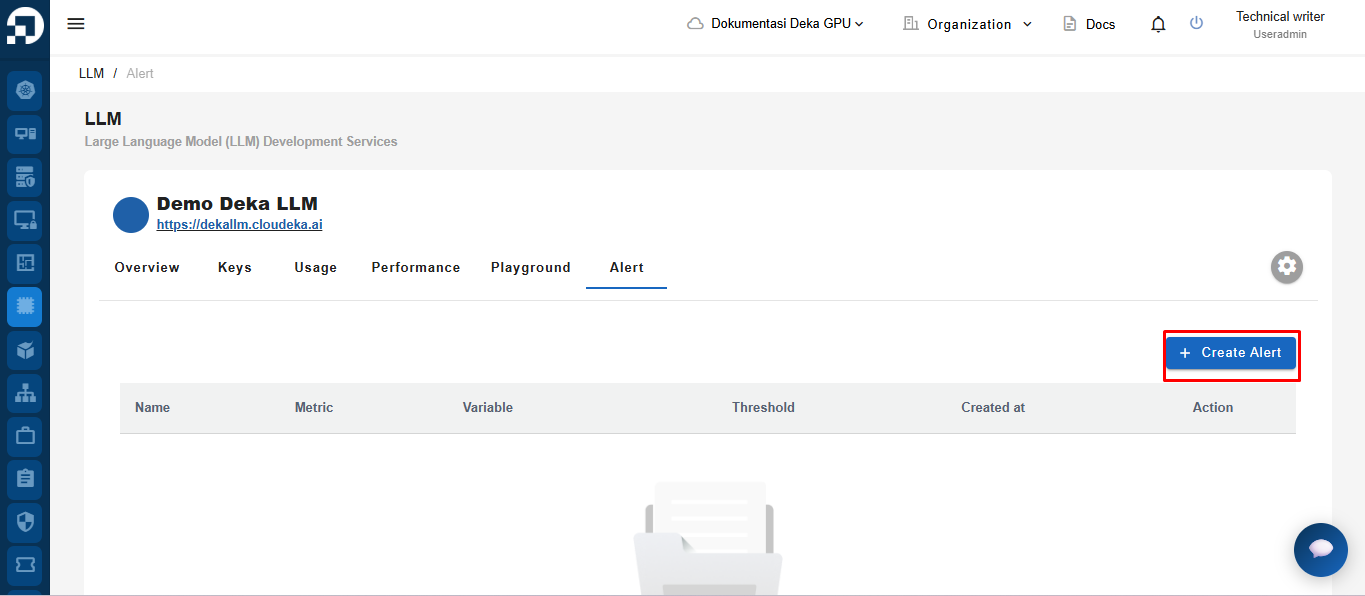
*Create a New Alert* merupakan salah satu fitur yang tersedia pada tab *Alert* yang digunakan untuk mengatur batas penggunaan koin yang digunakan. Pada menu LLM di Layanan Portal Cloudeka, pilih tab *Alert*. Klik tombol **+ Create Alert**.

<figure><img src="https://753761090-files.gitbook.io/~/files/v0/b/gitbook-x-prod.appspot.com/o/spaces%2FtAYQyBIz2BclZ3ZHHlS4%2Fuploads%2Fgit-blob-e8ab191d2f9c13a832ae2ebe6cf3a4d171c006f3%2Funknown.png?alt=media" alt=""><figcaption></figcaption></figure>

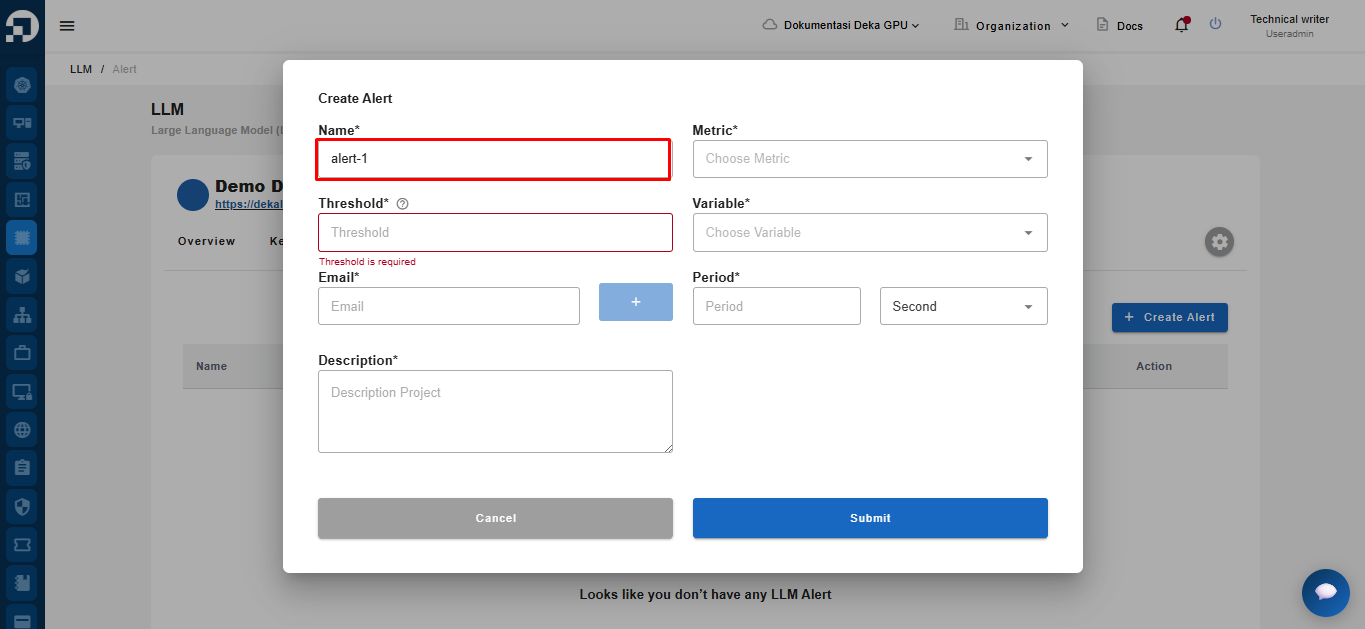
Jendela *Create Alert* akan ditampilkan. Tentukan nama yang akan digunakan.

<figure><img src="https://753761090-files.gitbook.io/~/files/v0/b/gitbook-x-prod.appspot.com/o/spaces%2FtAYQyBIz2BclZ3ZHHlS4%2Fuploads%2Fgit-blob-45c9663c55148b7d6c0049f96b836558cc3131fe%2Funknown.png?alt=media" alt=""><figcaption></figcaption></figure>

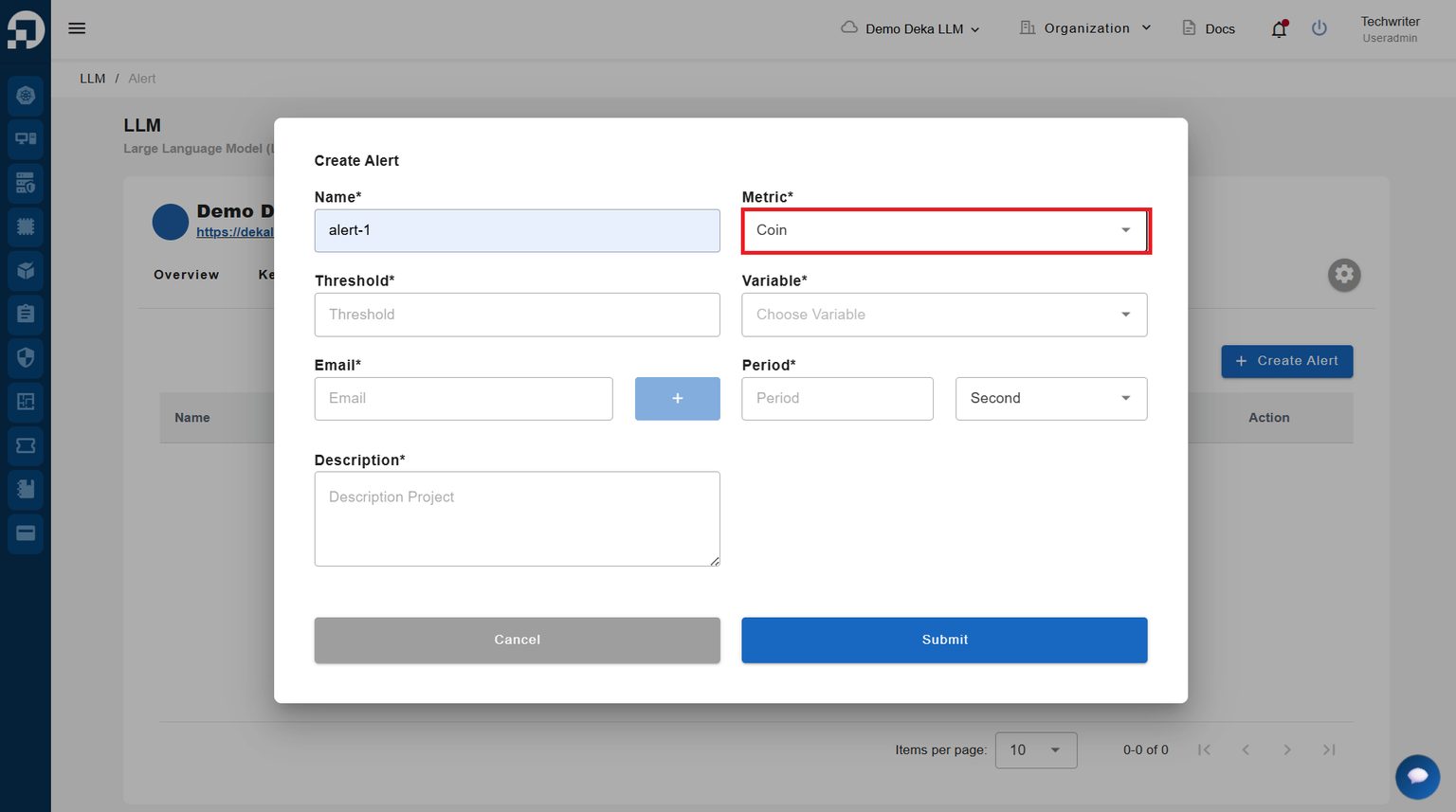
Pada *field* *Metric*, Anda dapat memilih *Coin* atau *Spend*. Pada panduan ini, pilih *Coin*.

<figure><img src="https://753761090-files.gitbook.io/~/files/v0/b/gitbook-x-prod.appspot.com/o/spaces%2FtAYQyBIz2BclZ3ZHHlS4%2Fuploads%2Fgit-blob-8822aab5ac23bf541821f5b0e289f2a41e436692%2Fimage.png?alt=media" alt=""><figcaption></figcaption></figure>

Atur nilai batas koin.

<figure><img src="https://753761090-files.gitbook.io/~/files/v0/b/gitbook-x-prod.appspot.com/o/spaces%2FtAYQyBIz2BclZ3ZHHlS4%2Fuploads%2Fgit-blob-4964dca28f4077c7cc8b86f2d39b7e9581ef3842%2Fimage%20(1).png?alt=media" alt=""><figcaption></figcaption></figure>

In the Variable field, you can choose Less Than or Greater Than.

<figure><img src="https://753761090-files.gitbook.io/~/files/v0/b/gitbook-x-prod.appspot.com/o/spaces%2FtAYQyBIz2BclZ3ZHHlS4%2Fuploads%2Fgit-blob-266d2f9b137ed4719cfd81f11e2c7ef981656b8c%2Fimage%20(2).png?alt=media" alt=""><figcaption></figcaption></figure>

Once you select either Less Than or Greater Than, the Period field will appear.

<figure><img src="https://753761090-files.gitbook.io/~/files/v0/b/gitbook-x-prod.appspot.com/o/spaces%2FtAYQyBIz2BclZ3ZHHlS4%2Fuploads%2Fgit-blob-e19cbb37e1b02e26d4efe75e539d7c79e1fe8a8d%2Fimage%20(3).png?alt=media" alt=""><figcaption></figcaption></figure>

Add the email address that will receive the notification, then click the "**+**" button to add the email to the list of recipients for this LLM coin usage alert.

<figure><img src="https://753761090-files.gitbook.io/~/files/v0/b/gitbook-x-prod.appspot.com/o/spaces%2FtAYQyBIz2BclZ3ZHHlS4%2Fuploads%2Fgit-blob-16e9950e5b76bc00e7cc54b869a6e06a58a299de%2Fimage%20(4).png?alt=media" alt=""><figcaption></figcaption></figure>

After you click the "+" button, the email address will be added to the list of recipients.

<figure><img src="https://753761090-files.gitbook.io/~/files/v0/b/gitbook-x-prod.appspot.com/o/spaces%2FtAYQyBIz2BclZ3ZHHlS4%2Fuploads%2Fgit-blob-1445e63a14a318732e34935c86d3c29cef7c607e%2Fimage%20(5).png?alt=media" alt=""><figcaption></figcaption></figure>

Set the Period during which notifications should be sent.

<figure><img src="https://753761090-files.gitbook.io/~/files/v0/b/gitbook-x-prod.appspot.com/o/spaces%2FtAYQyBIz2BclZ3ZHHlS4%2Fuploads%2Fgit-blob-f5ec7642dabbe4d8ea42a622b79defee44e957dd%2Fimage%20(6).png?alt=media" alt=""><figcaption></figcaption></figure>

Enter a Description, then click Submit to add the alert to your LLM project alert list.

<figure><img src="https://753761090-files.gitbook.io/~/files/v0/b/gitbook-x-prod.appspot.com/o/spaces%2FtAYQyBIz2BclZ3ZHHlS4%2Fuploads%2Fgit-blob-b7b140cea5a9cd7910d0721c10734d03b9e24a20%2Fimage%20(7).png?alt=media" alt=""><figcaption></figcaption></figure>

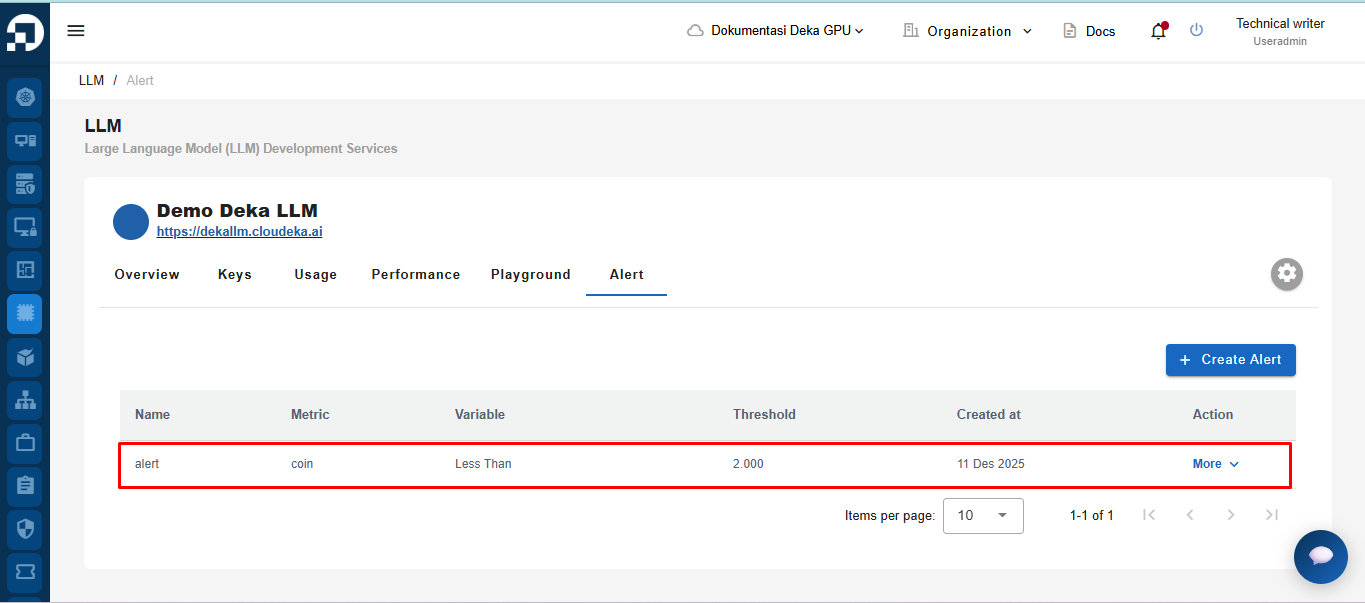
A notification will appear: "**LLM Alert has been successfully created.**"

<figure><img src="https://753761090-files.gitbook.io/~/files/v0/b/gitbook-x-prod.appspot.com/o/spaces%2FtAYQyBIz2BclZ3ZHHlS4%2Fuploads%2Fgit-blob-40a253b4509a06408a3be3f38bfcffcb33131111%2Funknown.png?alt=media" alt=""><figcaption></figcaption></figure>

You can receive notification emails based on the configurations you make.