> For the complete documentation index, see [llms.txt](https://docs.cloudeka.ai/llms.txt). Markdown versions of documentation pages are available by appending `.md` to page URLs; this page is available as [Markdown](https://docs.cloudeka.ai/deka-gpu-documentations/panduan-untuk-enterprise/service-portal-cloudeka/account-setting/ssh-key.md).

# SSH Key

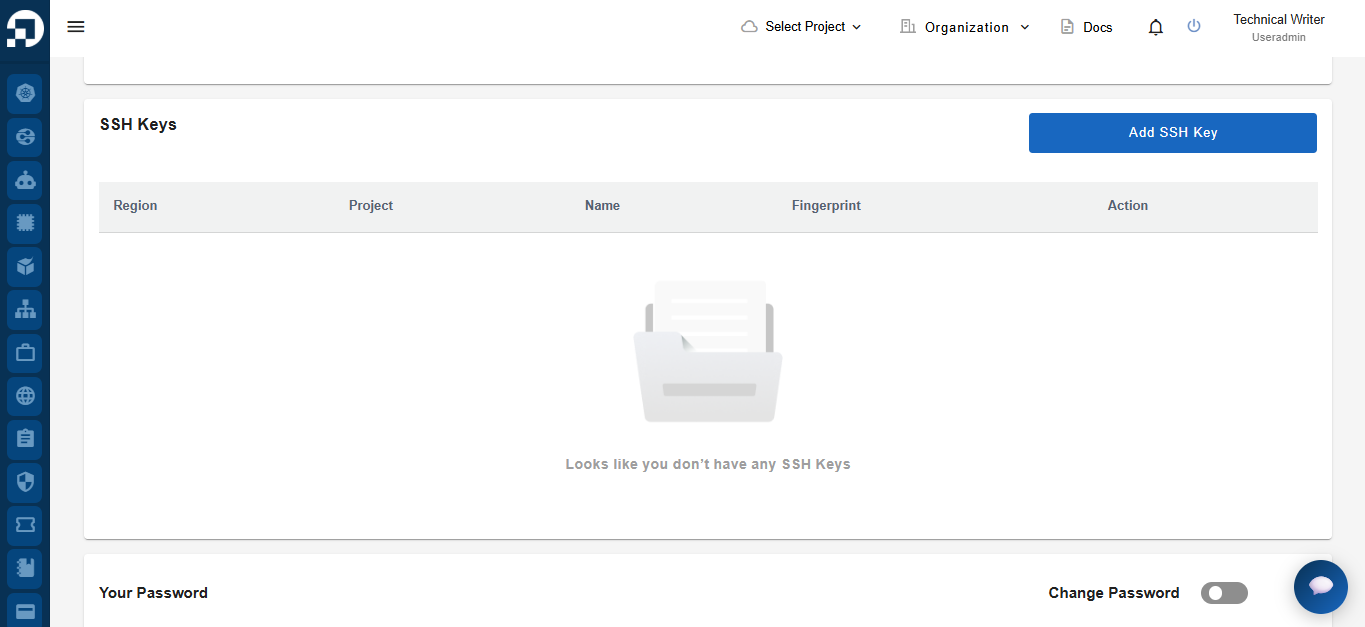
Bagian **S*****SH Keys*** digunakan untuk mengelola *SSH public key* yang dapat digunakan untuk autentikasi yang aman saat mengakses *compute resource* yang didukung, seperti *virtual machine*, tanpa menggunakan *password*. Pengguna dapat menambah, melihat, dan menghapus *SSH key* yang terkait dengan akun mereka.

<figure><img src="https://753761090-files.gitbook.io/~/files/v0/b/gitbook-x-prod.appspot.com/o/spaces%2FtAYQyBIz2BclZ3ZHHlS4%2Fuploads%2Fgit-blob-88c9a195f750ffe89ca4035c2f9c73a70fd2db95%2Fimage.png?alt=media" alt=""><figcaption></figcaption></figure>

## Menambah *SSH Key*

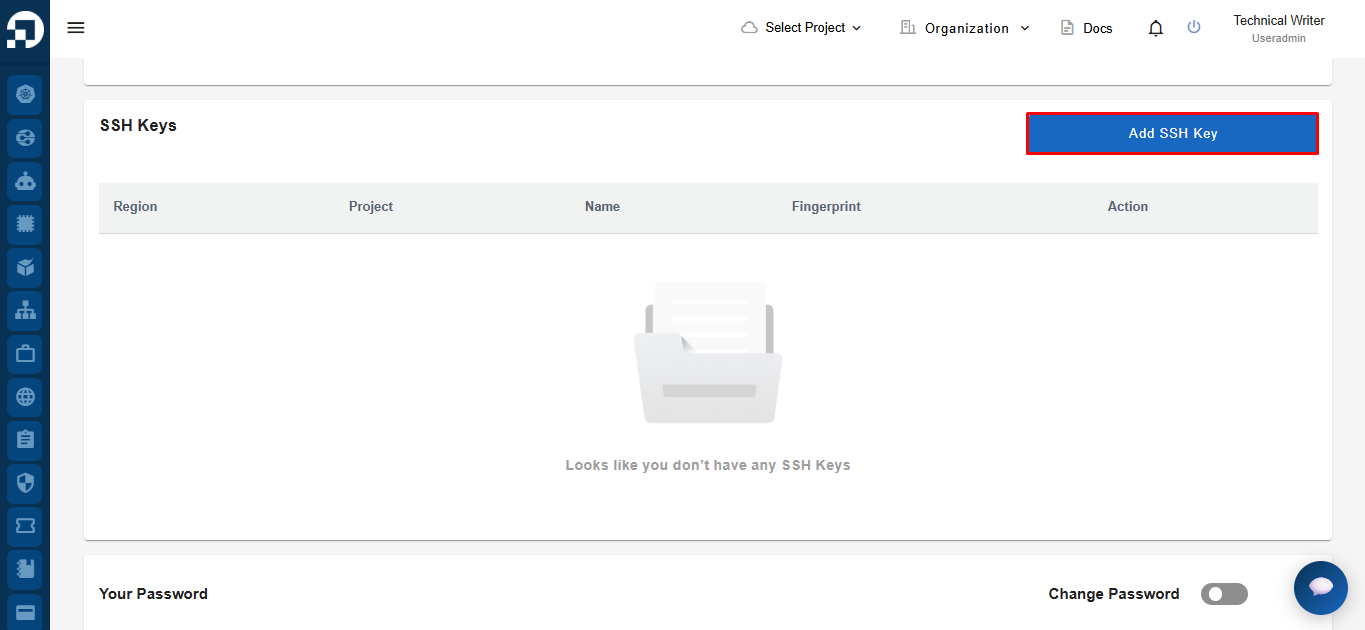
Untuk menambahkan *SSH key* baru, klik ***Add SSH Key***.

<figure><img src="https://753761090-files.gitbook.io/~/files/v0/b/gitbook-x-prod.appspot.com/o/spaces%2FtAYQyBIz2BclZ3ZHHlS4%2Fuploads%2Fgit-blob-bf273e20f4de40679dbf1fc6e330d37bf85cc3c0%2Fimage.png?alt=media" alt=""><figcaption></figcaption></figure>

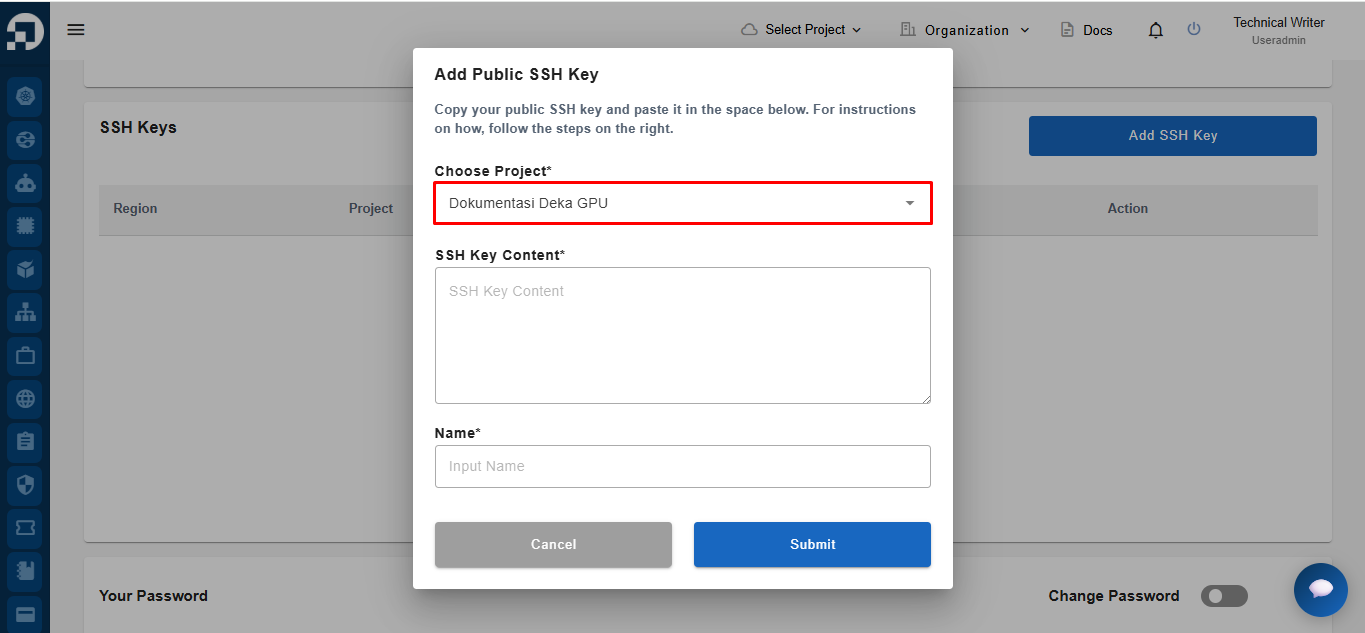
Sistem akan menampilkan formulir ***Add Public SSH Key***. Pilih proyek tempat *SSH key* akan ditambahkan dari *dropdown **Choose Project***.

<figure><img src="https://753761090-files.gitbook.io/~/files/v0/b/gitbook-x-prod.appspot.com/o/spaces%2FtAYQyBIz2BclZ3ZHHlS4%2Fuploads%2Fgit-blob-3403cbcbc6cace78427332a69b3b8963d3c5f551%2Fimage.png?alt=media" alt=""><figcaption></figcaption></figure>

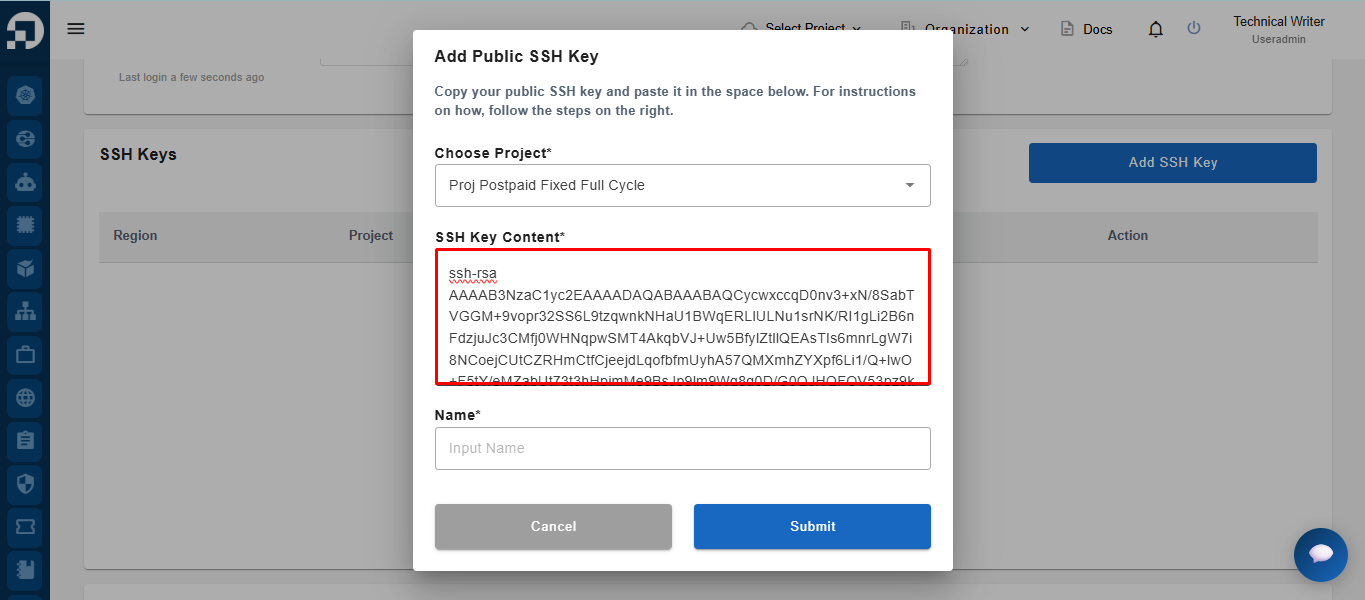
Setelah memilih proyek, tempelkan ***public SSH key*** yang sebelumnya sudah Anda buat ke kolom ***SSH Key Content***.

<figure><img src="https://753761090-files.gitbook.io/~/files/v0/b/gitbook-x-prod.appspot.com/o/spaces%2FtAYQyBIz2BclZ3ZHHlS4%2Fuploads%2Fgit-blob-49e732f93e95d2ecf438ea59149b65d1d12e81e3%2Fimage.png?alt=media" alt=""><figcaption></figcaption></figure>

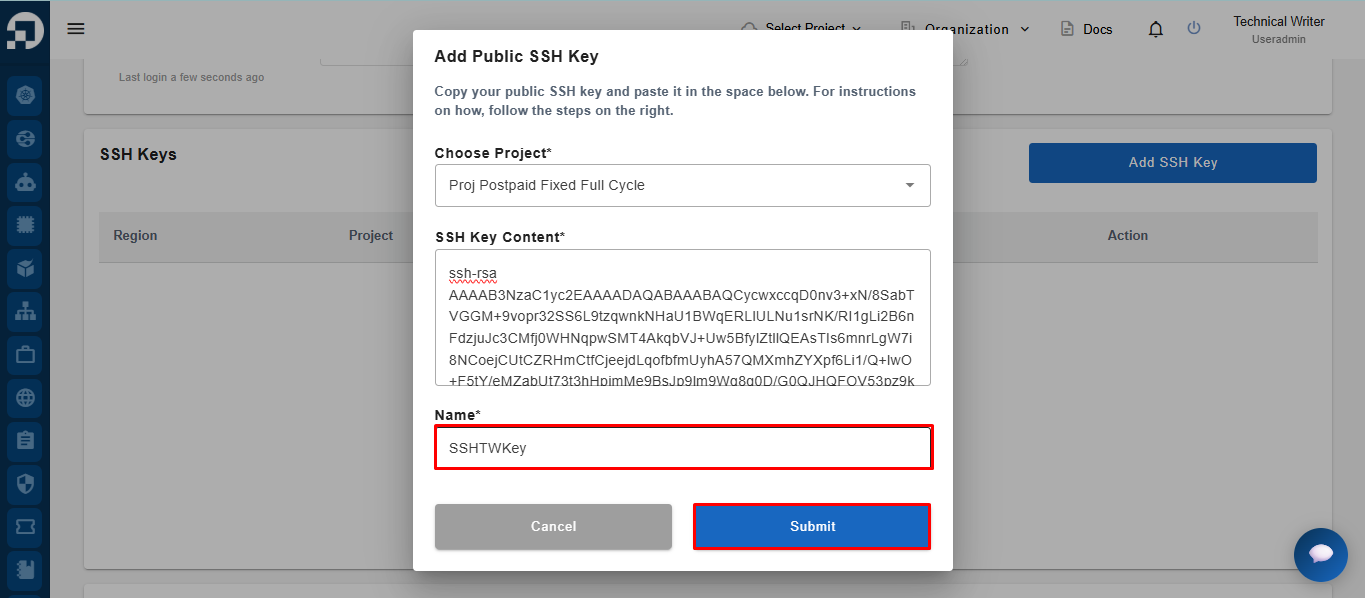
Masukkan nama untuk *SSH key* tersebut pada kolom ***Name***, kemudian klik ***Submit*** untuk menyimpan *SSH key*.

<figure><img src="https://753761090-files.gitbook.io/~/files/v0/b/gitbook-x-prod.appspot.com/o/spaces%2FtAYQyBIz2BclZ3ZHHlS4%2Fuploads%2Fgit-blob-cf3ad58164d329f2dfc44fdc91e2a2ff3e3ba0f5%2Fimage.png?alt=media" alt=""><figcaption></figcaption></figure>

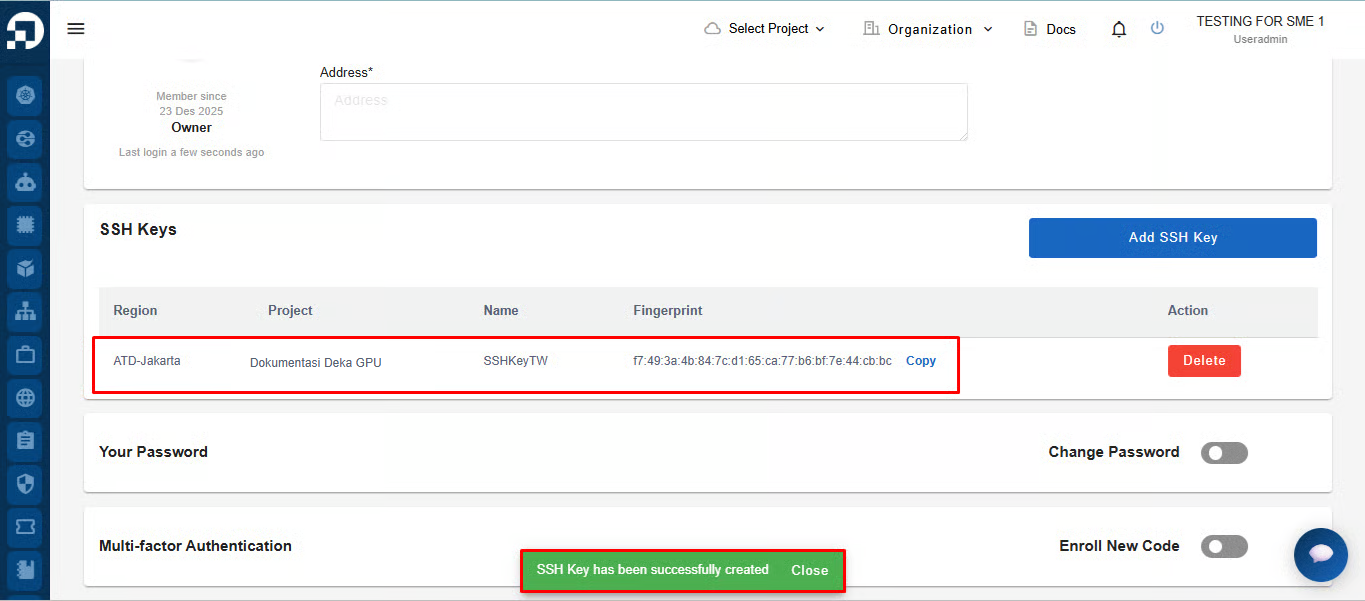
Jika *SSH key* berhasil dibuat, sistem akan menampilkan notifikasi **"*****SSH Key has been successfully created.*****"** *SSH key* yang baru dibuat kemudian akan ditambahkan ke daftar ***SSH Keys***.

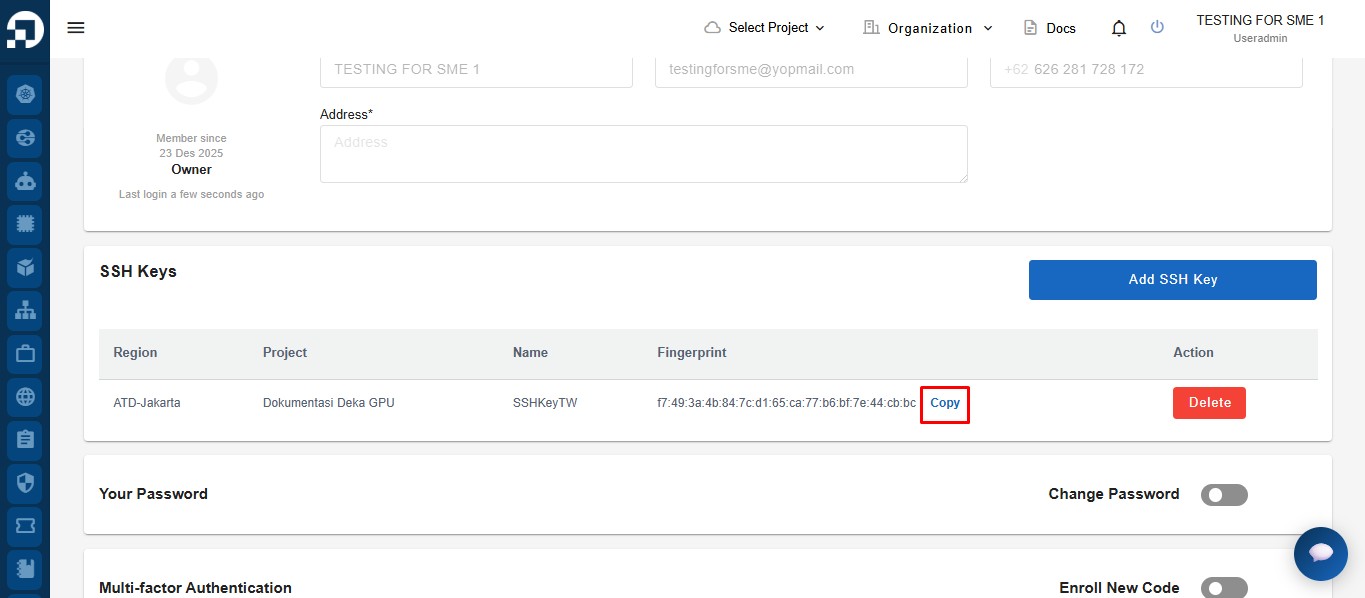
<figure><img src="https://753761090-files.gitbook.io/~/files/v0/b/gitbook-x-prod.appspot.com/o/spaces%2FtAYQyBIz2BclZ3ZHHlS4%2Fuploads%2Fgit-blob-98c65ad1bd34cc37104919d83a6209cfa3e847aa%2Fdokgpu.png?alt=media" alt=""><figcaption></figcaption></figure>

Klik ***Copy*** untuk menyalin ***SSH Key Fingerprint*** ke *clipboard* Anda untuk verifikasi atau referensi di kemudian hari.

<figure><img src="https://753761090-files.gitbook.io/~/files/v0/b/gitbook-x-prod.appspot.com/o/spaces%2FtAYQyBIz2BclZ3ZHHlS4%2Fuploads%2Fgit-blob-b43dd96bf2adaae8e8c688b3269d99df8f825163%2Fimage.png?alt=media" alt=""><figcaption></figcaption></figure>

## Menghapus *SSH Key*

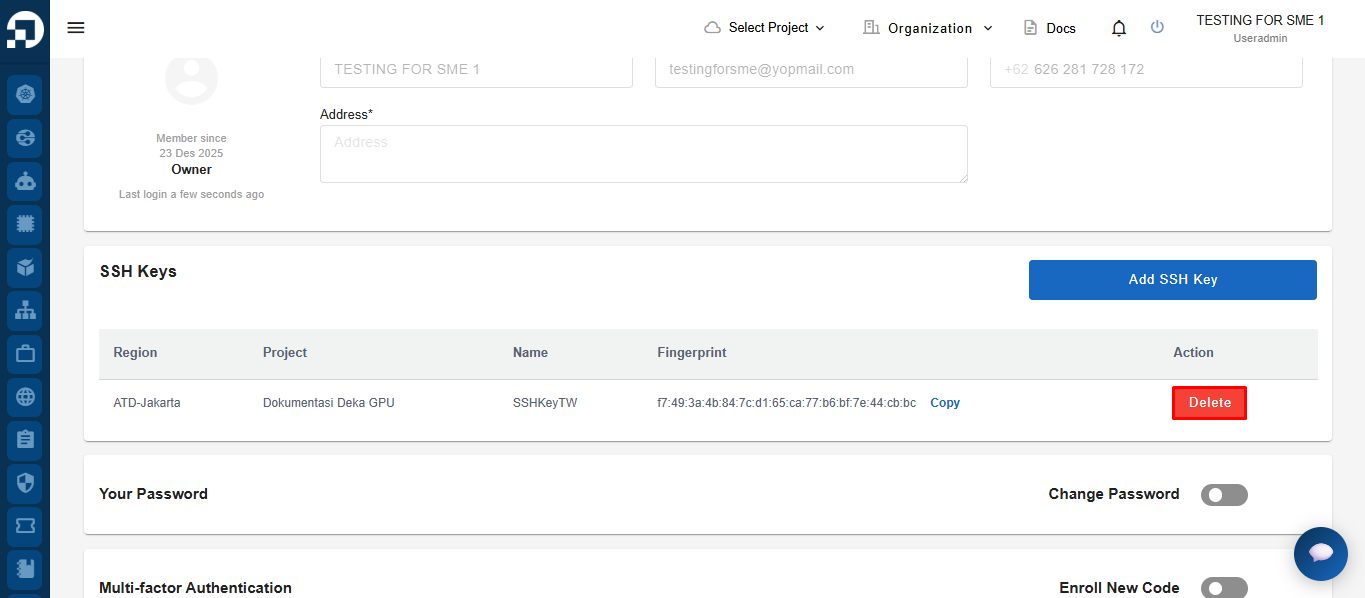
Klik ***Delete*** pada kolom ***Action*** untuk *SSH key* yang ingin Anda hapus.

<figure><img src="https://753761090-files.gitbook.io/~/files/v0/b/gitbook-x-prod.appspot.com/o/spaces%2FtAYQyBIz2BclZ3ZHHlS4%2Fuploads%2Fgit-blob-dba030bc41a0c9d608fc2c97f43e9e867ea66455%2Fimage.png?alt=media" alt=""><figcaption></figcaption></figure>

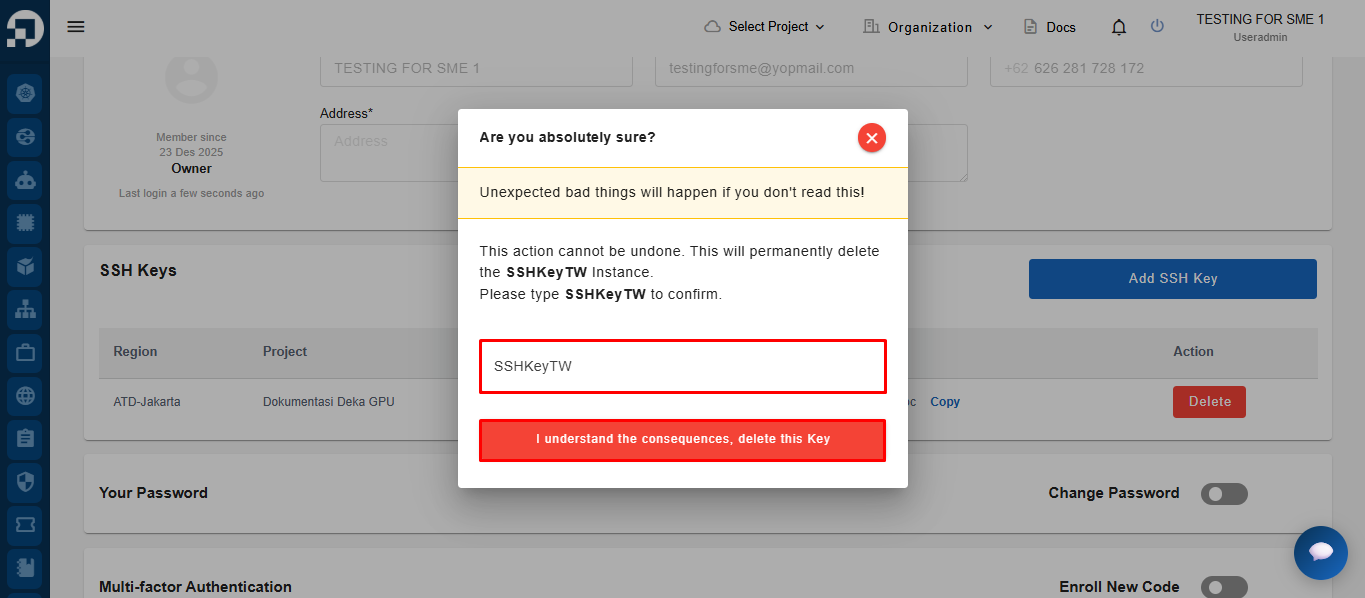
Sistem akan menampilkan jendela konfirmasi. Masukkan nama ***SSH key*** pada kolom konfirmasi, kemudian klik ***I understand the consequences, delete this Key*** untuk menghapus *SSH key* secara permanen.

<figure><img src="https://753761090-files.gitbook.io/~/files/v0/b/gitbook-x-prod.appspot.com/o/spaces%2FtAYQyBIz2BclZ3ZHHlS4%2Fuploads%2Fgit-blob-f8259ccd970f29c8e6c01e42280ded1a4a601bfe%2Fimage.png?alt=media" alt=""><figcaption></figcaption></figure>

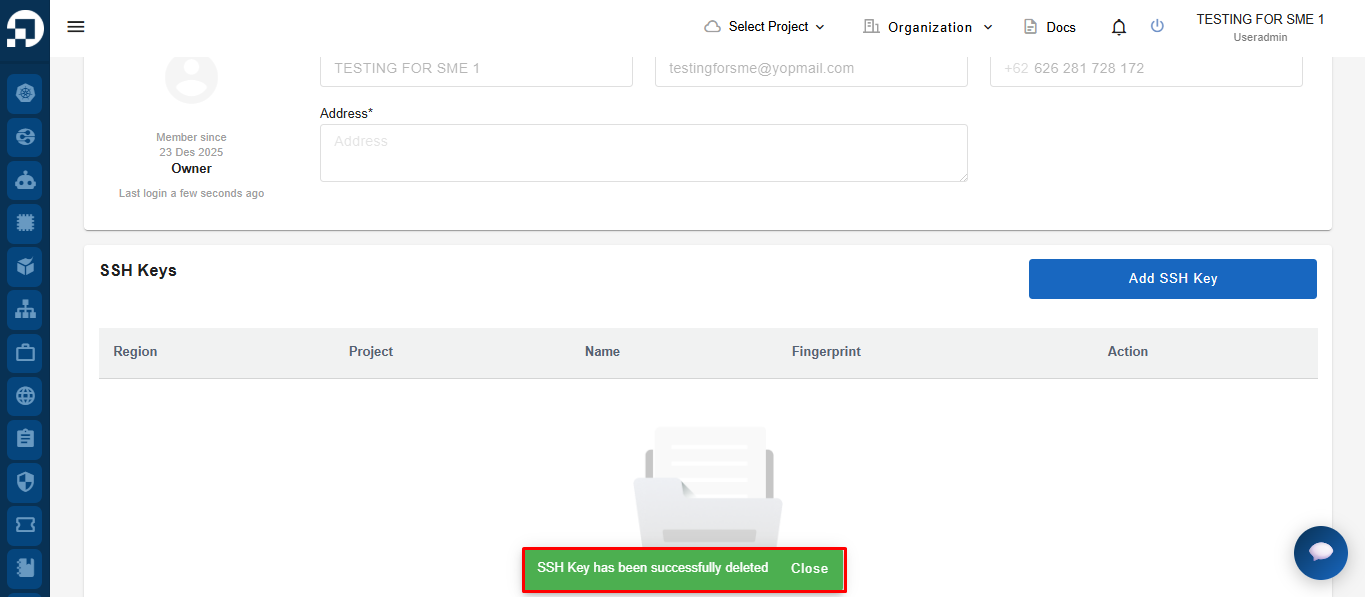
Jika *SSH key* berhasil dihapus, sistem akan menampilkan notifikasi **"*****SSH Key has been successfully deleted.*****"** *SSH key* yang dihapus kemudian tidak lagi ditampilkan dalam daftar ***SSH Key*****s**.
<figure><img src="https://753761090-files.gitbook.io/~/files/v0/b/gitbook-x-prod.appspot.com/o/spaces%2FtAYQyBIz2BclZ3ZHHlS4%2Fuploads%2Fgit-blob-042798f5da21f11d51be8145c418a6d44e257ddd%2Fimage.png?alt=media" alt=""><figcaption></figcaption></figure>