# IPSec Connection

The IPSec Connection section displays details of the established VPN connection, including local and remote endpoint information (ID and Host) and the assigned role. Expanding the Child SA Entries provides additional information such as subnet details and traffic statistics, including bytes and packets in/out.

The following are the steps to view IPSec Connection details:

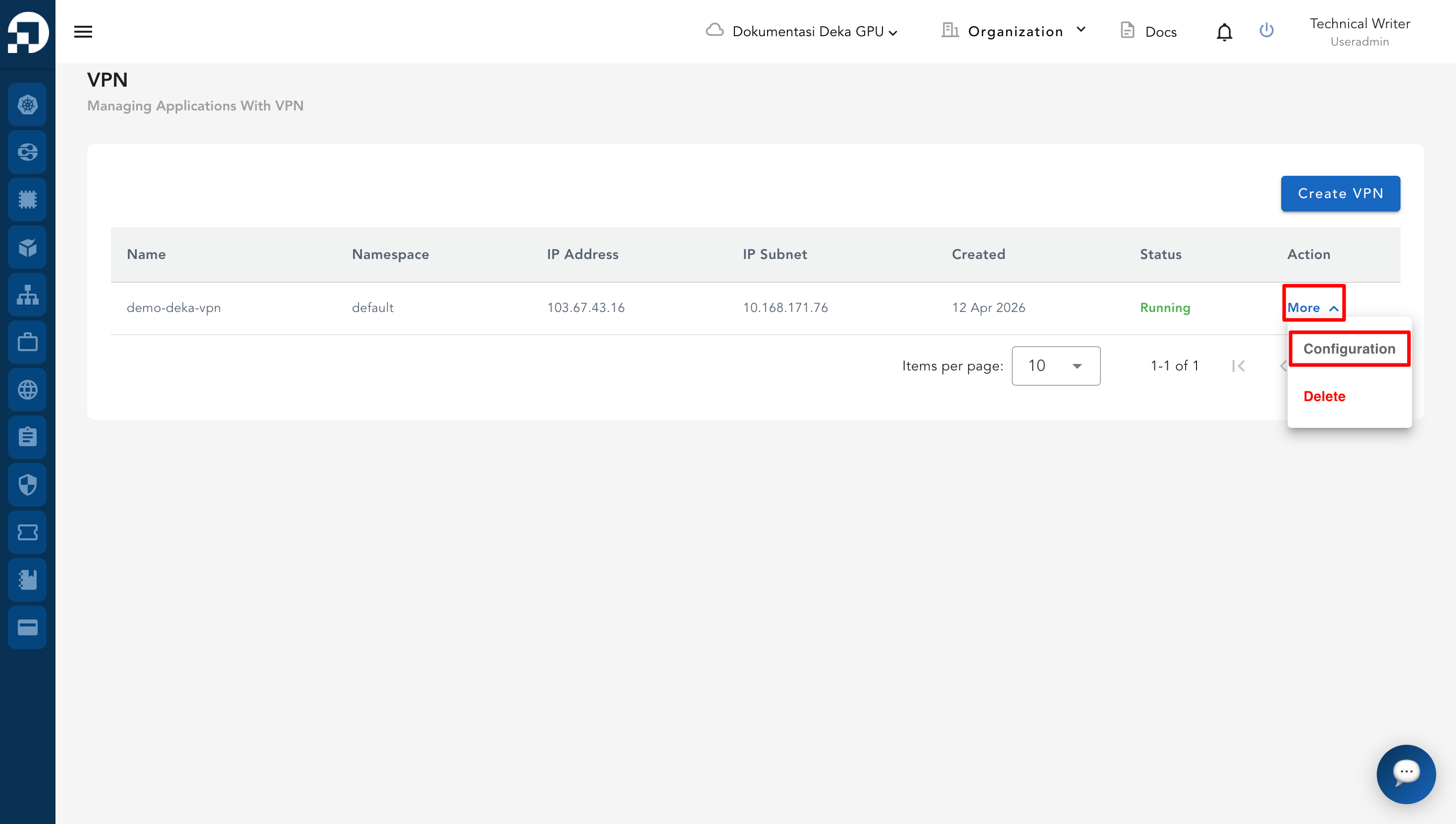
* From the **VPN List Table**, select one of the VPN entries and click **More** then **Configuration**.

<figure><img src="/files/4tEAApuYJq8MIMQlxjky" alt=""><figcaption></figcaption></figure>

* On the **IPSec** page, scroll down to the **IPSec Connection** section. This section shows:

<table><thead><tr><th width="110.66668701171875">Column</th><th>Description</th></tr></thead><tbody><tr><td>Local</td><td>Displays the ID and Host (IP address + port) of the local endpoint.</td></tr><tr><td>Remote</td><td>Displays the ID and Host (IP address + port) of the remote endpoint.</td></tr><tr><td>Role</td><td>Displays the role of the connection (for example, Responder).</td></tr></tbody></table>

* To display additional details, click the **Show Child SA Entries** button.

<figure><img src="/files/daORpbaJpEPLNkynyNrD" alt=""><figcaption></figcaption></figure>

* The system will then display:

<figure><img src="/files/72i7uJJY28wy78Ki19TY" alt=""><figcaption></figcaption></figure>

<table><thead><tr><th width="169.00006103515625">Column</th><th>Description</th></tr></thead><tbody><tr><td>Local Subnet</td><td>Displays the local subnet information of the IPSec connection.</td></tr><tr><td>Remote Subnet</td><td>Displays the remote subnet information of the IPSec connection.</td></tr><tr><td>Stats</td><td>Shows traffic statistics including <strong>Bytes in/out</strong> and <strong>Packets in/out</strong>.</td></tr></tbody></table>


---

# Agent Instructions
This documentation is published with GitBook. GitBook is the documentation platform designed so that both humans and AI agents can read, navigate, and reason over technical content effectively. Learn more at gitbook.com.

## Querying This Documentation
If you need additional information that is not directly available in this page, you can query the documentation dynamically by asking a question.

Perform an HTTP GET request on the current page URL with the `ask` query parameter:

```
GET https://docs.cloudeka.ai/guidance-for-individual/deka-vpn/configuration-deka-vpn-ipsec/ipsec-connection.md?ask=<question>
```

The question should be specific, self-contained, and written in natural language.
The response will contain a direct answer to the question and relevant excerpts and sources from the documentation.

Use this mechanism when the answer is not explicitly present in the current page, you need clarification or additional context, or you want to retrieve related documentation sections.
