# Multi Agent

This guide covers running multiple isolated agents in a single OpenClaw deployment on Cloudeka.

## What is Multi-Agent?

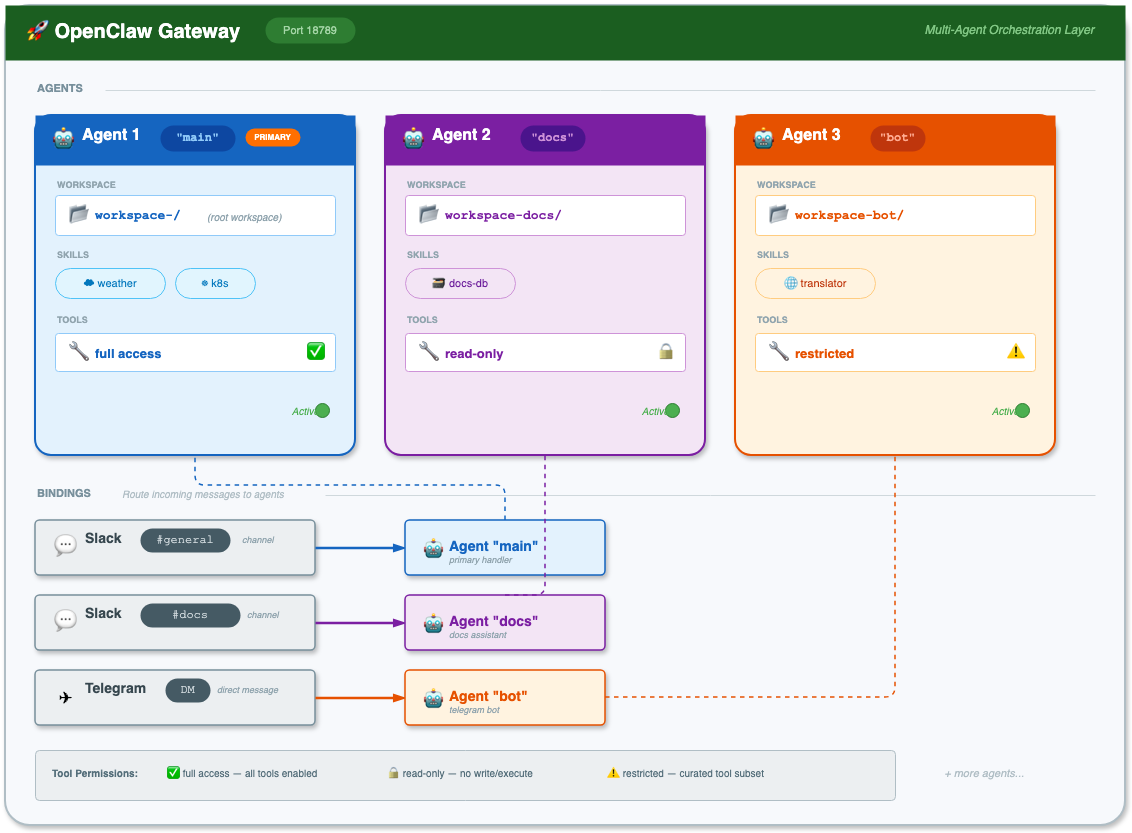
Multi-agent allows you to run multiple isolated "brains" in one OpenClaw gateway:

* **Separate workspaces** — Each agent has its own files, AGENTS.md, SOUL.md
* **Separate state** — Each agent has its own auth profiles and sessions
* **Separate skills** — Each agent can have different skills installed
* **Message routing** — Bindings route messages to specific agents

## Use Cases

<table><thead><tr><th width="226.88885498046875">Use Case</th><th>Description</th></tr></thead><tbody><tr><td>Multiple teams</td><td>Different agents for different Slack channels</td></tr><tr><td>Different personalities</td><td>Chat bot vs. code reviewer vs. incident responder</td></tr><tr><td>Permission boundaries</td><td>Restricted tools for untrusted channels</td></tr><tr><td>Multiple accounts</td><td>Different WhatsApp numbers for different purposes</td></tr></tbody></table>

## Architecture

<figure><img src="/files/ZhrXcXwC7iiJxm191Xku" alt=""><figcaption></figcaption></figure>

## Path Structure

Each agent has isolated paths on the PVC:

<table><thead><tr><th width="208.22219848632812">Component</th><th>Path</th></tr></thead><tbody><tr><td>Workspace</td><td><code>/home/node/.openclaw/workspace-&#x3C;agentId>/</code></td></tr><tr><td>Agent state</td><td><code>/home/node/.openclaw/agents/&#x3C;agentId>/agent/</code></td></tr><tr><td>Sessions</td><td><code>/home/node/.openclaw/agents/&#x3C;agentId>/sessions/</code></td></tr><tr><td>Skills</td><td><code>/home/node/.openclaw/workspace-&#x3C;agentId>/skills/</code></td></tr></tbody></table>

## Complete Example: Two Agents

Let's set up two agents:

* **main** — General purpose, full tools, kubectl access
* **docs** — Documentation assistant with access to internal docs wiki

### Step 1: Update openclaw\.json

Edit `charts/openclaw/values.yaml`:

```yaml
app-template:
  configMaps:
    config:
      data:
        openclaw.json: |
          {
            "gateway": {
              "port": 18789,
              "mode": "local",
              "trustedProxies": ["10.250.199.254"]
            },

            "browser": {
              "enabled": true,
              "defaultProfile": "default",
              "profiles": {
                "default": {
                  "cdpUrl": "http://localhost:9222",
                  "color": "#4285F4"
                }
              }
            },

            "agents": {
              "defaults": {
                "model": {
                  "primary": "dekallm/zai/glm-4.7-fp8"
                },
                "userTimezone": "UTC",
                "timeoutSeconds": 600,
                "maxConcurrent": 1
              },
              "list": [
                {
                  "id": "main",
                  "default": true,
                  "workspace": "/home/node/.openclaw/workspace-main",
                  "identity": {
                    "name": "OpenClaw Main",
                    "emoji": "🦞"
                  }
                },
                {
                  "id": "docs",
                  "workspace": "/home/node/.openclaw/workspace-docs",
                  "agentDir": "/home/node/.openclaw/agents/docs/agent",
                  "identity": {
                    "name": "Docs Helper",
                    "emoji": "📚"
                  },
                  "model": {
                    "primary": "dekallm/zai/glm-4.7-fp8"
                  },
                  "tools": {
                    "allow": ["read", "write", "edit"],
                    "deny": ["exec", "browser"]
                  }
                }
              ]
            },

            "models": {
              "mode": "merge",
              "providers": {
                "dekallm": {
                  "baseUrl": "https://dekallm.cloudeka.ai/v1",
                  "apiKey": "${DEKALLM_API_KEY}",
                  "api": "openai-completions",
                  "models": [{ "id": "zai/glm-4.7-fp8", "name": "GLM 4.7" }]
                }
              }
            },

            "session": {
              "scope": "per-sender",
              "store": "/home/node/.openclaw/sessions",
              "reset": {
                "mode": "idle",
                "idleMinutes": 60
              }
            },

            "logging": {
              "level": "info",
              "consoleLevel": "info",
              "consoleStyle": "compact",
              "redactSensitive": "tools"
            },

            "tools": {
              "profile": "full",
              "web": {
                "search": { "enabled": false },
                "fetch": { "enabled": true }
              }
            },

            "channels": {
              "telegram": {
                "botToken": "${TELEGRAM_BOT_TOKEN}",
                "enabled": true
              },
              "slack": {
                "botToken": "${SLACK_BOT_TOKEN}",
                "appToken": "${SLACK_APP_TOKEN}",
                "enabled": true,
                "replyToMode": "all",
                "channels": {
                  "C0AEWJDTED6": { "allow": true, "requireMention": false },
                  "C0INCIDENTS": { "allow": true, "requireMention": false }
                }
              }
            },

            "hooks": {
              "enabled": true,
              "token": "${OPENCLAW_HOOKS_TOKEN}"
            },

            "bindings": [
              {
                "agentId": "docs",
                "match": {
                  "channel": "slack",
                  "peer": { "kind": "group", "id": "C0DOCS" }
                }
              },
              {
                "agentId": "main",
                "match": { "channel": "slack" }
              },
              {
                "agentId": "main",
                "match": { "channel": "telegram" }
              }
            ]
          }
```

### Step 2: Configure Per-Agent Kubeconfigs

```yaml
app-template:
  persistence:
    # Kubeconfig for "main" agent
    kubeconfig-main:
      enabled: true
      type: secret
      name: openclaw-kubeconfig-main
      advancedMounts:
        main:
          main:
            - path: /home/node/.openclaw/workspace-main/.kube/config
              subPath: config
              readOnly: true

    # Kubeconfig for "docs" agent (read-only cluster access)
    kubeconfig-docs:
      enabled: true
      type: secret
      name: openclaw-kubeconfig-docs
      advancedMounts:
        main:
          main:
            - path: /home/node/.openclaw/workspace-docs/.kube/config
              subPath: config
              readOnly: true
```

Create the secrets:

```bash
# Full access for main
kubectl create secret generic openclaw-kubeconfig-main \
  --from-file=config=/path/to/kubeconfig-full.yaml \
  -n openclaw

# Read-only for docs
kubectl create secret generic openclaw-kubeconfig-docs \
  --from-file=config=/path/to/kubeconfig-readonly.yaml \
  -n openclaw
```

### Step 3: Configure Per-Agent Skills

```yaml
app-template:
  persistence:
    # Weather skill for main agent
    main-weather-skill:
      enabled: true
      type: configMap
      name: weather-skill
      advancedMounts:
        main:
          main:
            - path: /home/node/.openclaw/workspace-main/skills/weather/SKILL.md
              subPath: SKILL.md
              readOnly: true

    # Wiki skill for docs agent
    docs-wiki-skill:
      enabled: true
      type: configMap
      name: docs-wiki-skill
      advancedMounts:
        main:
          init-skills:
            - path: /tmp/skills/docs
              readOnly: true

    # MCP config for docs agent
    docs-mcporter-config:
      enabled: true
      type: configMap
      name: docs-mcporter-config
      advancedMounts:
        main:
          main:
            - path: /home/node/.openclaw/workspace-docs/config/mcporter.json
              subPath: mcporter.json
              readOnly: true
```

### Step 4: Update init-skills for Multi-Agent

```yaml
app-template:
  controllers:
    main:
      initContainers:
        init-skills:
          command:
            - sh
            - -c
            - |
              log() { echo "[$(date -Iseconds)] [init-skills] $*"; }
              log "Starting skills initialization"

              # ============================================================
              # Runtime Dependencies (shared)
              # ============================================================
              mkdir -p /home/node/.openclaw/bin
              if [ ! -f /home/node/.openclaw/bin/uv ]; then
                log "Installing uv..."
                curl -LsSf https://astral.sh/uv/install.sh | env UV_INSTALL_DIR=/home/node/.openclaw/bin sh
              fi

              mkdir -p /home/node/.openclaw/node_modules/.bin
              if [ ! -f /home/node/.openclaw/node_modules/.bin/mcporter ]; then
                log "Installing mcporter..."
                cd /home/node/.openclaw && npm install mcporter
              fi

              # ============================================================
              # Extract Skill Archives (per-agent)
              # ============================================================
              for archive in /tmp/skills/*/skill.tar.gz; do
                if [ -f "$archive" ]; then
                  agent=$(basename "$(dirname "$archive")")
                  log "Extracting skills for agent: $agent"
                  # Extract to agent-specific workspace
                  tar xzf "$archive" -C "/home/node/.openclaw/workspace-$agent"
                fi
              done

              # ============================================================
              # Install ClawHub Skills (per-agent)
              # ============================================================
              # Agent: main
              mkdir -p /home/node/.openclaw/workspace-main/skills
              cd /home/node/.openclaw/workspace-main
              for skill in weather; do
                if [ -n "$skill" ] && [ ! -d "skills/${skill##*/}" ]; then
                  log "Installing skill for main: $skill"
                  npx -y clawhub install "$skill" --no-input || log "WARNING: Failed: $skill"
                fi
              done

              # Agent: docs
              mkdir -p /home/node/.openclaw/workspace-docs/skills
              cd /home/node/.openclaw/workspace-docs
              for skill in ; do
                if [ -n "$skill" ] && [ ! -d "skills/${skill##*/}" ]; then
                  log "Installing skill for docs: $skill"
                  npx -y clawhub install "$skill" --no-input || log "WARNING: Failed: $skill"
                fi
              done

              log "Skills initialization complete"
```

### Step 5: Deploy

```bash
helm upgrade openclaw ./charts/openclaw -n openclaw -f charts/openclaw/values.yaml
```

## Understanding Bindings

Bindings route inbound messages to agents using **most-specific wins**:

1. `peer` **match** (exact DM/group ID) — Highest priority
2. `accountId` match for a channel
3. **Channel-level** match
4. **Fallback** to default agent

### Binding Examples

```json
"bindings": [
  // Specific Slack group → docs agent
  {
    "agentId": "docs",
    "match": {
      "channel": "slack",
      "peer": { "kind": "group", "id": "C0INCIDENTS" }
    }
  },
  // Specific Telegram DM → bot agent
  {
    "agentId": "bot",
    "match": {
      "channel": "telegram",
      "peer": { "kind": "direct", "id": "15551234567" }
    }
  },
  // All Slack → main agent
  {
    "agentId": "main",
    "match": { "channel": "slack" }
  },
  // Everything else → main (default)
]
```

## Per-Agent Tool Restrictions

Restrict what tools each agent can use:

```json
{
  "agents": {
    "list": [
      {
        "id": "public-bot",
        "tools": {
          "allow": ["read", "sessions_list"],
          "deny": ["exec", "write", "edit", "browser"]
        }
      },
      {
        "id": "admin",
        // No restrictions — all tools available
      }
    ]
  }
}
```

### Available Tools

| Tool             | Description            |
| ---------------- | ---------------------- |
| `exec`           | Execute shell commands |
| `read`           | Read files             |
| `write`          | Write files            |
| `edit`           | Edit files             |
| `browser`        | Browser automation     |
| `sessions_*`     | Session management     |
| `agent_to_agent` | Agent messaging        |

## Per-Agent Sandboxing

Isolate agents in Docker containers (requires OpenClaw v2026.1.6+):

```json
{
  "agents": {
    "list": [
      {
        "id": "trusted",
        "sandbox": {
          "mode": "off"  // No sandbox
        }
      },
      {
        "id": "untrusted",
        "sandbox": {
          "mode": "all",      // Always sandboxed
          "scope": "agent",   // One container per agent
          "docker": {
            "image": "node:20-alpine",
            "setupCommand": "apt-get update && apt-get install -y git curl"
          }
        }
      }
    ]
  }
}
```

## Testing Multi-Agent Setup

### Verify Agent Configuration

```bash
kubectl exec -n openclaw deployment/openclaw -- node dist/index.js agents list --bindings
```

Expected output:

```
┌──────────────┬──────────────────┬─────────────┐
│ Agent ID     │ Name             │ Bindings    │
├──────────────┼──────────────────┼─────────────┤
│ main         │ OpenClaw 🦞       │ slack, tg  │
│ docs         │ Docs Helper 📚    │ #docs      │
└──────────────┴──────────────────┴─────────────┘
```

### Test Message Routing

Send messages to different channels and verify the correct agent responds:

1. **Slack #docs** → Should get Docs agent (📚)
2. **Slack #general** → Should get Main agent (🦞)
3. **Telegram DM** → Should get Main agent (🦞)

## Sharing Skills Between Agents

To share skills across agents, use the shared skills directory:

```yaml
# Mount shared skill to both agents
shared-skill:
  enabled: true
  type: configMap
  name: common-skill
  advancedMounts:
    main:
      main:
        - path: /home/node/.openclaw/skills/common/SKILL.md
          subPath: SKILL.md
          readOnly: true
```

Or use symlinks in init-skills:

```bash
# Create symlink in each agent's workspace
ln -s /home/node/.openclaw/skills/common /home/node/.openclaw/workspace-main/skills/common
ln -s /home/node/.openclaw/skills/common /home/node/.openclaw/workspace-docs/skills/common
```

## Common Patterns

### Pattern 1: Channel-Based Routing

Route entire channels to different agents:

```json
"bindings": [
  { "agentId": "support", "match": { "channel": "slack", "peer": { "id": "C0SUPPORT" } } },
  { "agentId": "engineering", "match": { "channel": "slack", "peer": { "id": "C0ENG" } } }
]
```

### Pattern 2: Mention-Based Routing

Route @mentions to a specialized agent:

```json
"bindings": [
  { "agentId": "code-reviewer", "match": { "channel": "slack", "peer": { "id": "C0ENG" } } }
]
```

Then in the agent config:

```json
{
  "id": "code-reviewer",
  "groupChat": {
    "mentionPatterns": ["@review", "@reviewer", "@Code Review"]
  }
}
```

### Pattern 3: Account-Based Routing

Different WhatsApp accounts to different agents:

```json
"channels": {
  "whatsapp": {
    "accounts": {
      "personal": { "authDir": "~/.openclaw/credentials/whatsapp/personal" },
      "business": { "authDir": "~/.openclaw/credentials/whatsapp/business" }
    }
  }
},
"bindings": [
  { "agentId": "personal", "match": { "channel": "whatsapp", "accountId": "personal" } },
  { "agentId": "work", "match": { "channel": "whatsapp", "accountId": "business" } }
]
```


---

# Agent Instructions
This documentation is published with GitBook. GitBook is the documentation platform designed so that both humans and AI agents can read, navigate, and reason over technical content effectively. Learn more at gitbook.com.

## Querying This Documentation
If you need additional information that is not directly available in this page, you can query the documentation dynamically by asking a question.

Perform an HTTP GET request on the current page URL with the `ask` query parameter:

```
GET https://docs.cloudeka.ai/guidance-for-individual/reference/how-to-deployment-openclaw-on-cloudeka/multi-agent.md?ask=<question>
```

The question should be specific, self-contained, and written in natural language.
The response will contain a direct answer to the question and relevant excerpts and sources from the documentation.

Use this mechanism when the answer is not explicitly present in the current page, you need clarification or additional context, or you want to retrieve related documentation sections.
