> For the complete documentation index, see [llms.txt](https://docs.cloudeka.ai/llms.txt). Markdown versions of documentation pages are available by appending `.md` to page URLs; this page is available as [Markdown](https://docs.cloudeka.ai/guideline-for-enterprise/panduan-untuk-enterprise/deka-flexi/deka-volume-images/snapshot/snapshot-for-instance/take-snapshot.md).

# Membuat Snapshot

Panduan ini menjelaskan cara membuat *snapshot* untuk *instance*. Anda dapat membuat *snapshot* saat *instance* berjalan.

{% hint style="warning" %}
Pastikan Anda memiliki *instance* sebelum membuat *snapshot*. Buat *instance* melalui [Membuat *Instance VM*](/guideline-for-enterprise/panduan-untuk-enterprise/deka-flexi/deka-flexi-instance/create-vm-instance.md).
{% endhint %}

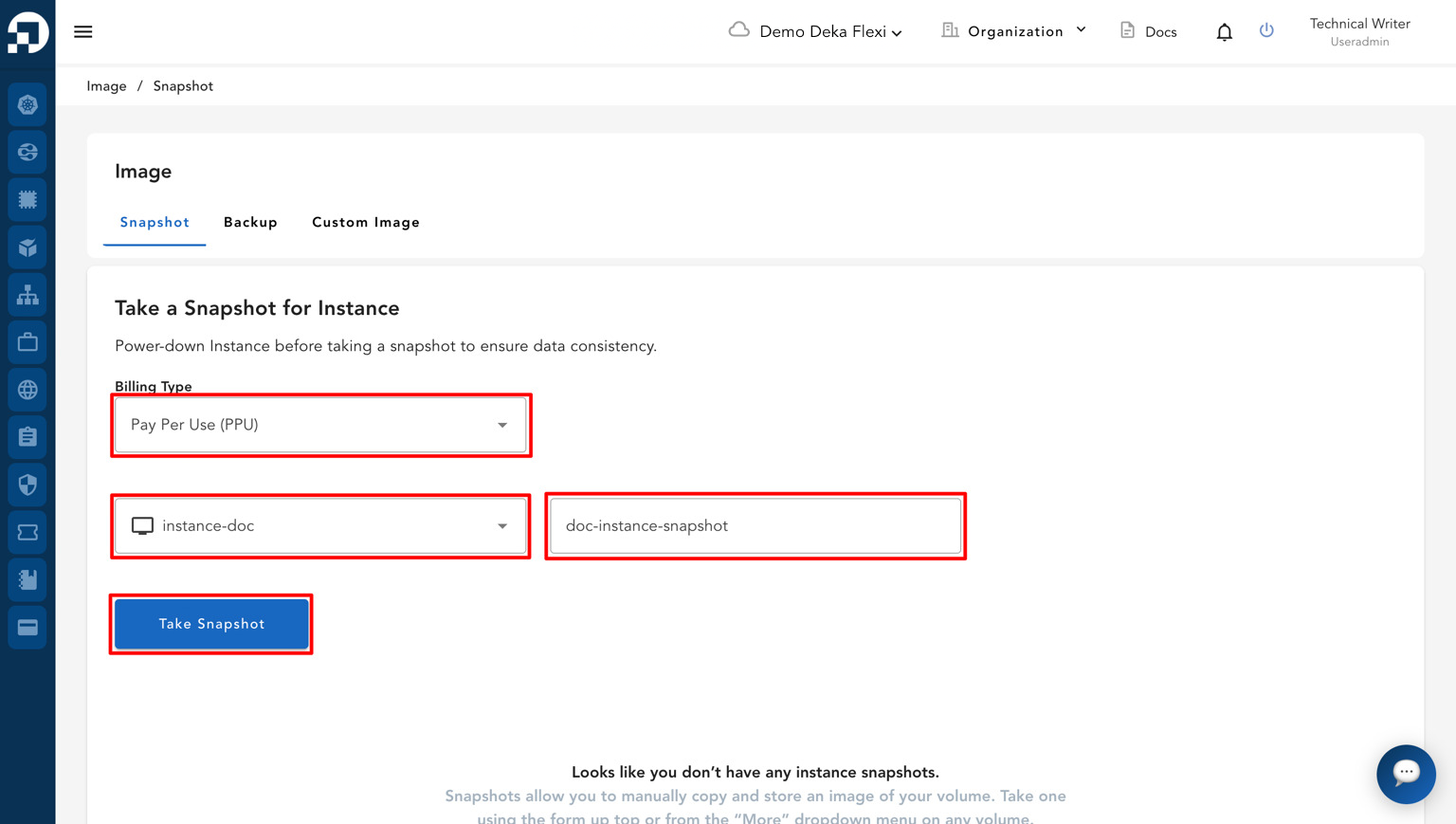
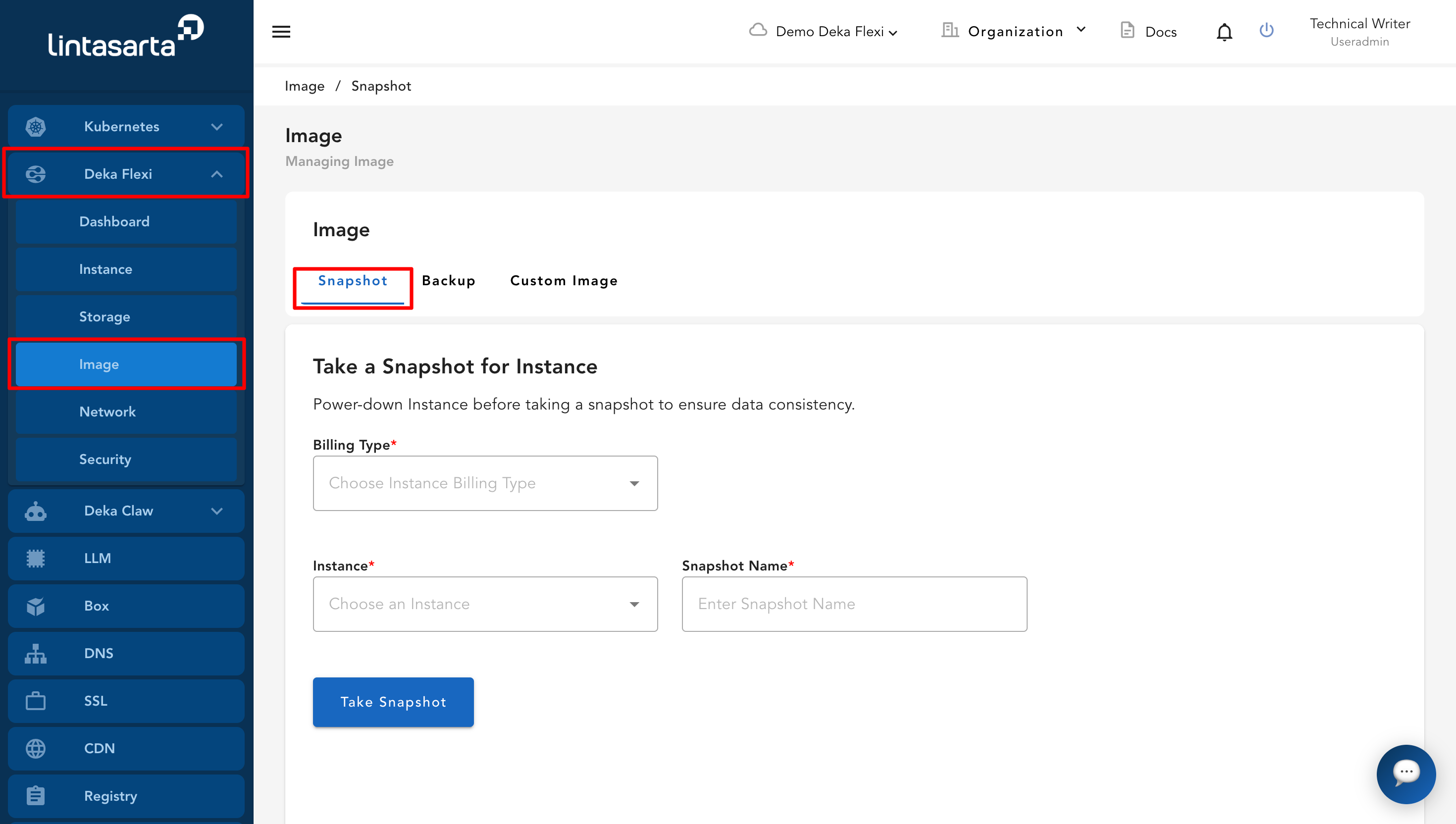
* Buka menu ***Images***, lalu masuk ke halaman ***Snapshot***.

<figure><img src="https://putri.box.cloudeka.id/cloudeka-assets/docs.cloudeka.ai/6dekaflexi/takesnapshotinstance_01.png" alt=""><figcaption></figcaption></figure>

* Isi formulir ***Take a Snapshot for Instance*** dengan memilih ***Billing Type***, memilih *instance* yang ingin dibuatkan *snapshot*, dan memasukkan nama *snapshot*.

<table><thead><tr><th width="232">Kolom</th><th>Deskripsi</th></tr></thead><tbody><tr><td><em><strong>Billing Type</strong></em></td><td>Pilih jenis <em>billing</em> sesuai metode pembayaran yang digunakan pada <em>project</em> Anda, seperti <em>Fixed</em> atau <em>Pay Per Use</em> (PPU).</td></tr><tr><td><em><strong>Choose an Instance</strong></em></td><td>Pilih <em>instance</em> yang ingin dibuatkan <em>snapshot</em>.</td></tr><tr><td><em><strong>Enter Snapshot Name</strong></em></td><td>Masukkan nama <em>snapshot</em>.</td></tr></tbody></table>

* Setelah melengkapi semua kolom yang diperlukan, klik tombol ***Take Snapshot***.

<figure><img src="https://putri.box.cloudeka.id/cloudeka-assets/docs.cloudeka.ai/6dekaflexi/takesnapshotinstance_02.png" alt=""><figcaption></figcaption></figure>

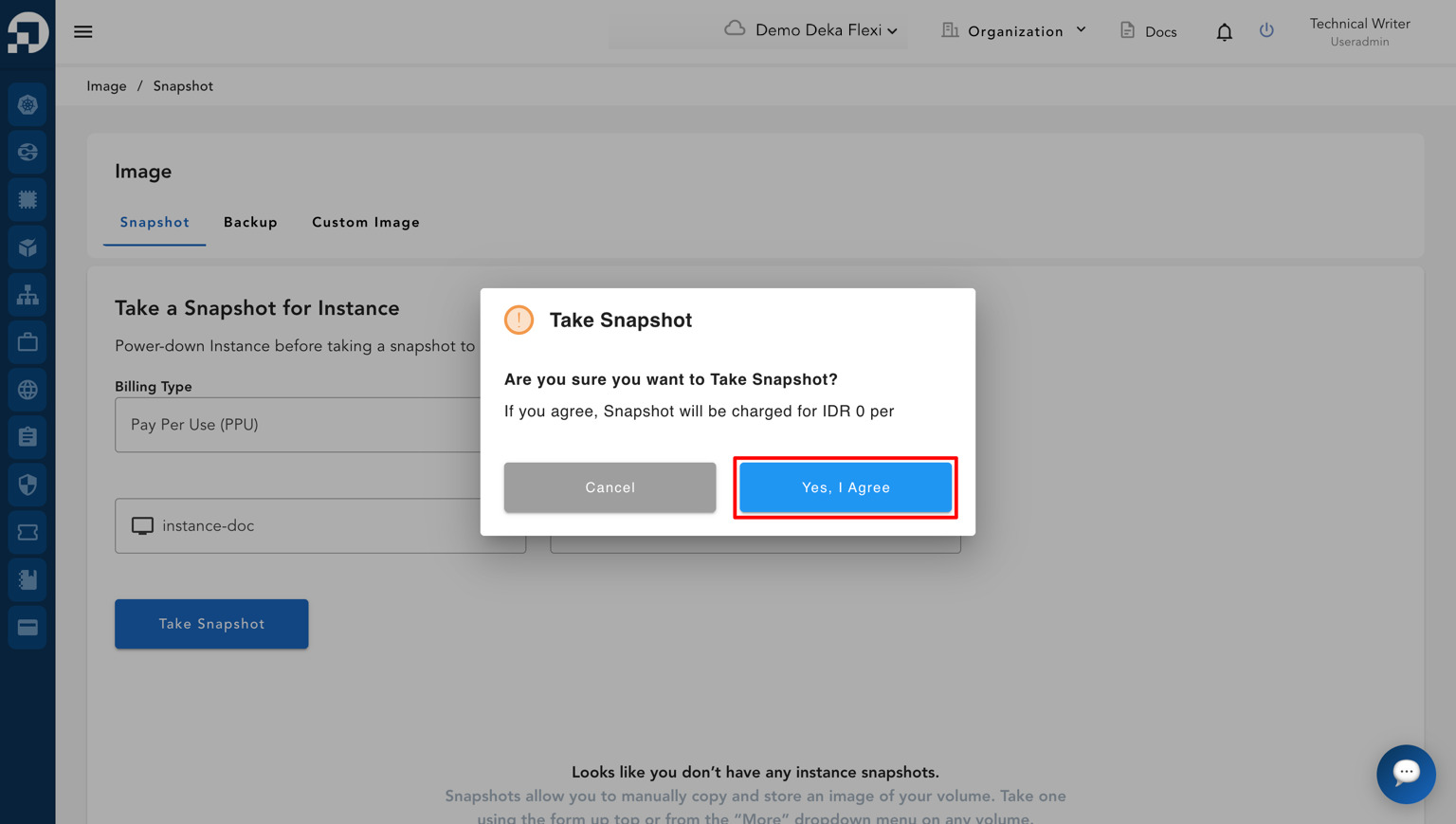
* *Pop-up* konfirmasi akan muncul. Klik ***Yes, I Agree*** untuk melanjutkan proses *snapshot*.

<figure><img src="https://putri.box.cloudeka.id/cloudeka-assets/docs.cloudeka.ai/6dekaflexi/takesnapshotinstance_03.png" alt=""><figcaption></figcaption></figure>

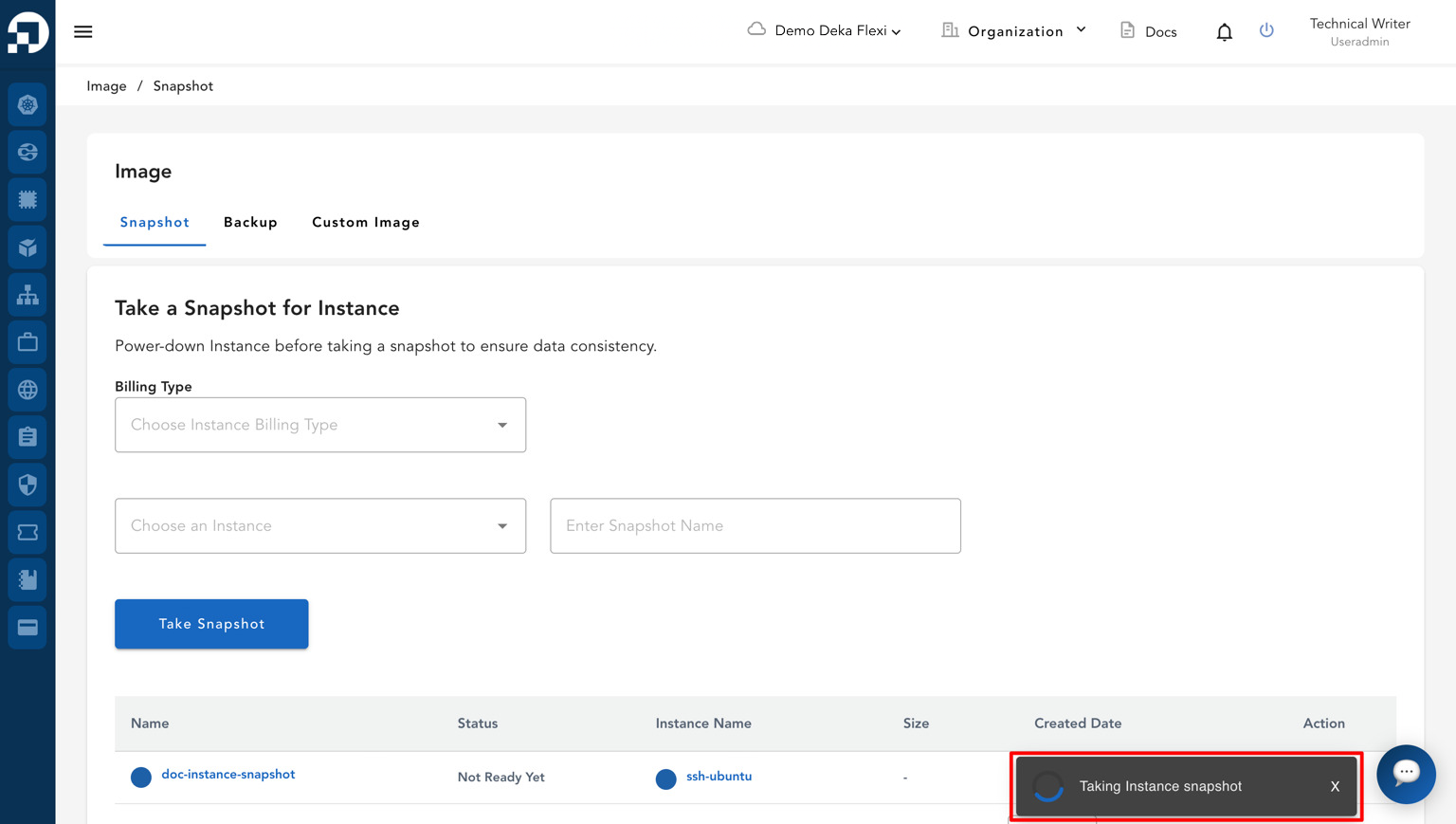
* Sistem akan mulai membuat *snapshot instance* dan menampilkan statusnya pada daftar *snapshot*.

<figure><img src="https://putri.box.cloudeka.id/cloudeka-assets/docs.cloudeka.ai/6dekaflexi/takesnapshotinstance_04.png" alt=""><figcaption></figcaption></figure>

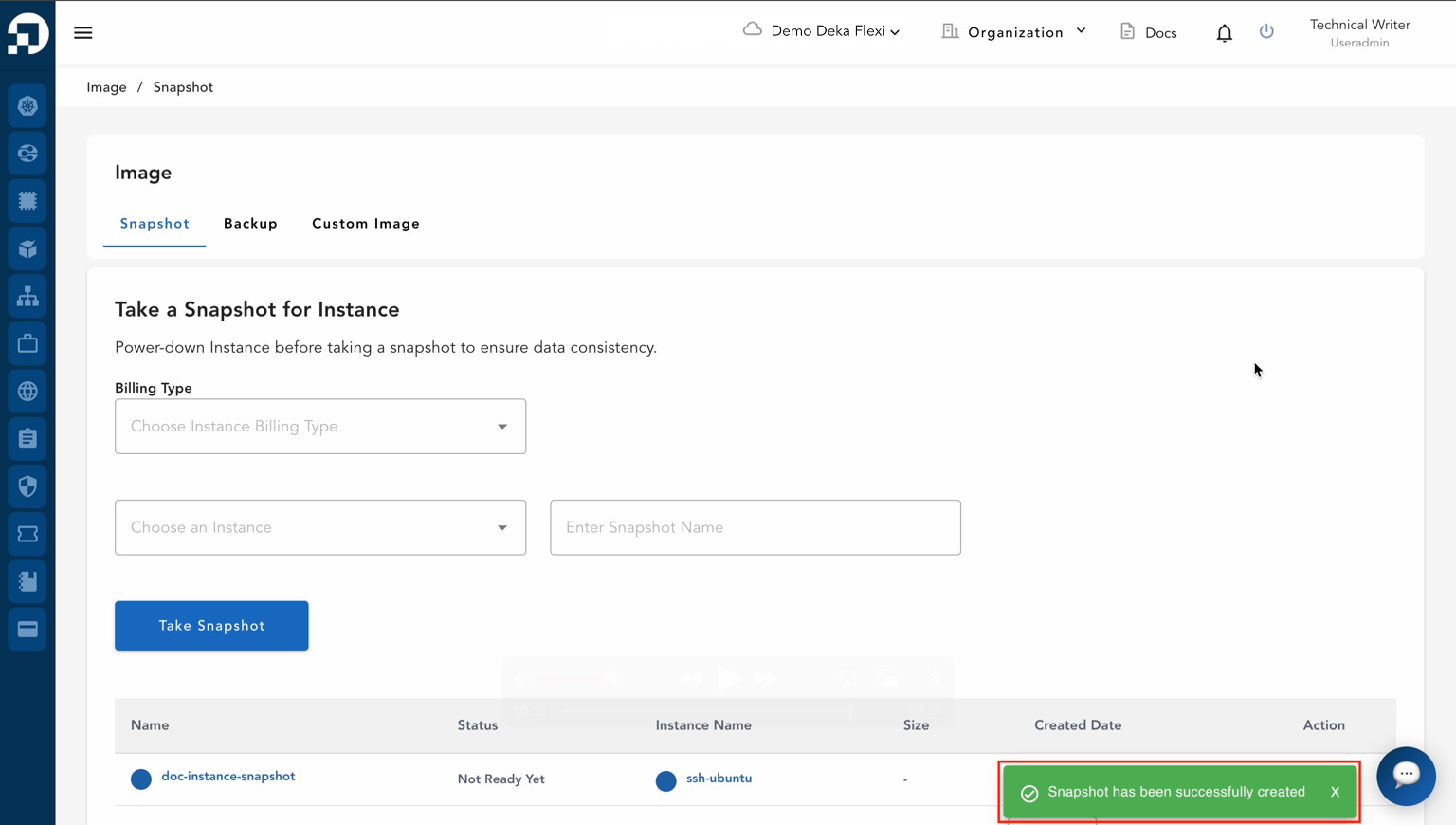
* Jika proses berhasil selesai, notifikasi dengan pesan ***"Snapshot has been successfully created"*** akan muncul.

<figure><img src="https://putri.box.cloudeka.id/cloudeka-assets/docs.cloudeka.ai/6dekaflexi/takesnapshotinstance_05.png" alt=""><figcaption></figcaption></figure>

* Daftar *snapshot instance* akan muncul dengan informasi berikut:

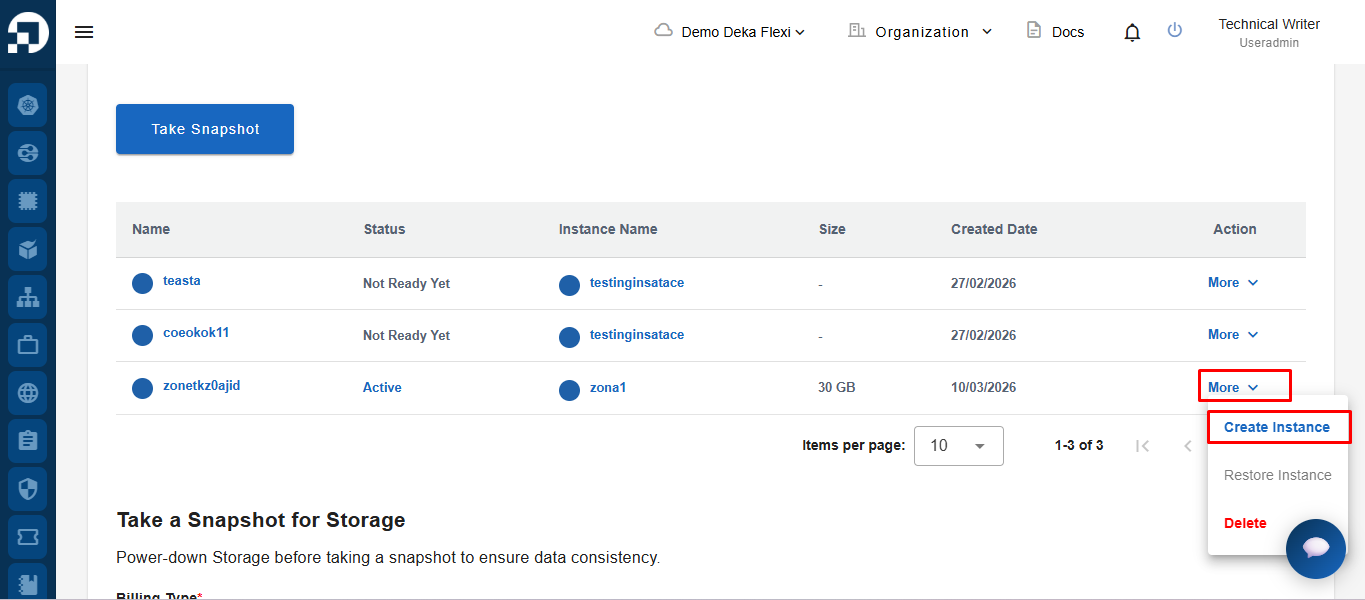
<table><thead><tr><th width="329">Kolom</th><th>Deskripsi</th></tr></thead><tbody><tr><td><em><strong>Name</strong></em></td><td>Nama <em>snapshot</em>.</td></tr><tr><td><em><strong>Status</strong></em></td><td>Status <em>snapshot</em>, seperti <em><strong>Active</strong></em> atau <em><strong>Not Ready Yet</strong></em>.</td></tr><tr><td><em><strong>Instance Name</strong></em></td><td>Nama <em>instance</em> asal <em>snapshot</em>.</td></tr><tr><td><em><strong>Size</strong></em></td><td>Ukuran <em>snapshot</em>.</td></tr><tr><td><em><strong>Created Date</strong></em></td><td>Tanggal dan waktu pembuatan <em>snapshot</em>.</td></tr><tr><td><em><strong>Action</strong></em></td><td>Tindakan yang tersedia untuk <em>snapshot</em>, seperti pemulihan atau penghapusan.</td></tr></tbody></table>

* Untuk membuat *instance*, klik tombol ***More*** pada data *snapshot* yang diinginkan, lalu pilih ***Create Instance***.

<figure><img src="https://putri.box.cloudeka.id/cloudeka-assets/docs.cloudeka.ai/6dekaflexi/takesnapshotinstance_06.png" alt=""><figcaption></figcaption></figure>

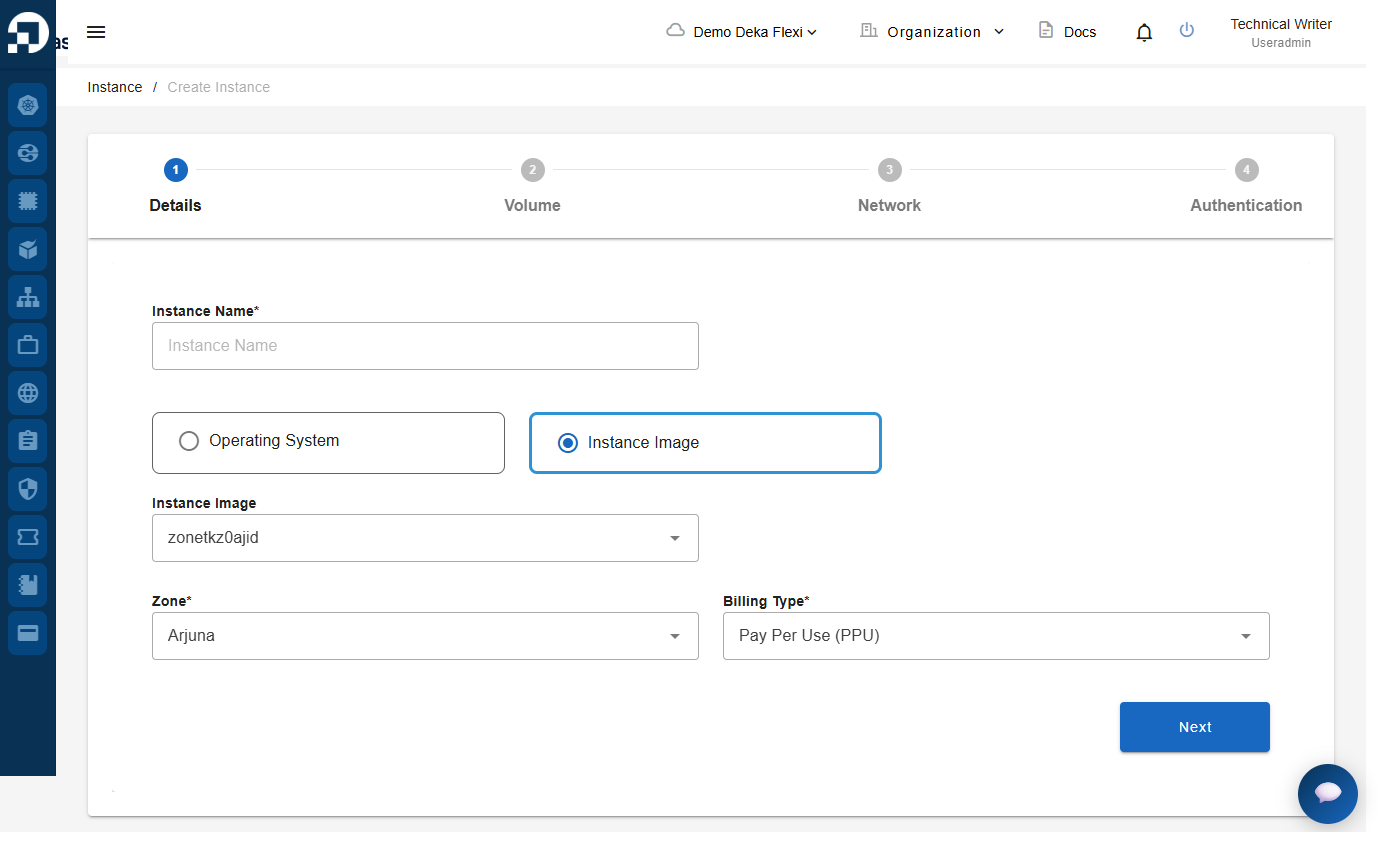
* Setelah mengklik ***Create Instance***, sistem akan menampilkan formulir pembuatan *instance* yang serupa dengan halaman pembuatan *instance* standar. Isi detail yang diperlukan. Untuk petunjuk lebih rinci, lihat bagian [Membuat  Instance](/guideline-for-enterprise/panduan-untuk-enterprise/nat-gateway/remote-instance/create-instance.md).

<figure><img src="https://putri.box.cloudeka.id/cloudeka-assets/docs.cloudeka.ai/6dekaflexi/takesnapshotinstance_07.png" alt=""><figcaption></figcaption></figure>