> For the complete documentation index, see [llms.txt](https://docs.cloudeka.ai/llms.txt). Markdown versions of documentation pages are available by appending `.md` to page URLs; this page is available as [Markdown](https://docs.cloudeka.ai/guideline-for-enterprise/panduan-untuk-enterprise/deka-gpu/deka-gpu-deka-guard/create-deka-guard/create-deny-all-egress.md).
# Membuat Deny All Egress
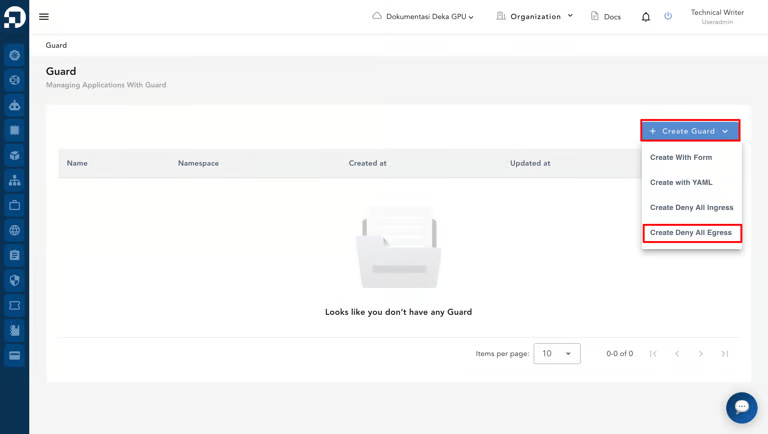
Pada halaman *Deka Guard*, klik tombol ***+ Create Guard*** dan pilih ***Create Deny All Egress***.
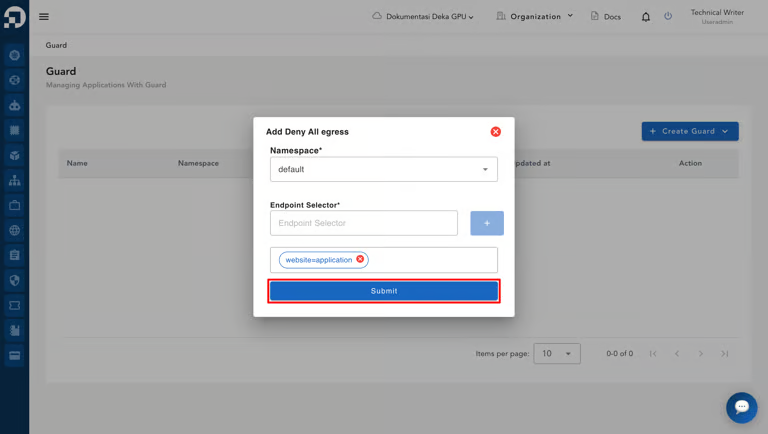
Formulir *Add Deny All Egress* akan ditampilkan. Pilih ***Namespace*** yang diinginkan, lalu tentukan ***Endpoint Selector*** dan klik ***Submit***.
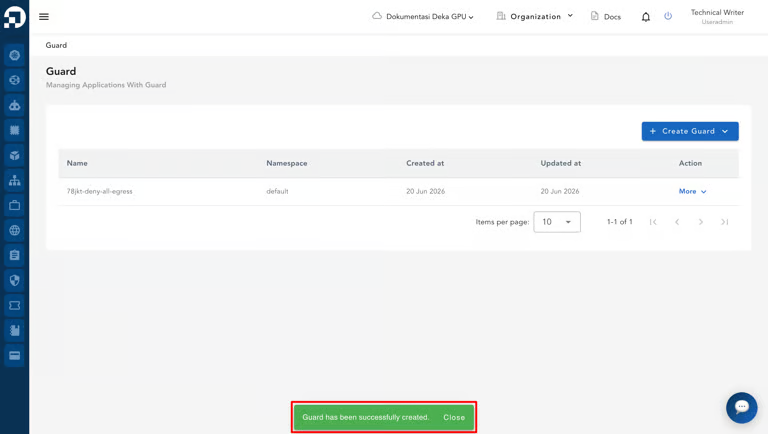
Notifikasi ***“Guard has been successfully created.”*** akan muncul setelah *Deka Guard* berhasil dibuat di *Service Portal* Cloudeka.