> For the complete documentation index, see [llms.txt](https://docs.cloudeka.ai/llms.txt). Markdown versions of documentation pages are available by appending `.md` to page URLs; this page is available as [Markdown](https://docs.cloudeka.ai/guideline-for-individual/deka-flexi/deka-flexi-security/security-firewall-rule.md).

# Security Firewall Rule

Firewall rules allow you to permit or deny connections to or from a virtual machine (vm) based on the configuration you specify. When you create a firewall rule, you define a set of components that determine what the rule does. Components allow you to target specific traffic types, based on traffic protocols, destination ports, sources, and destinations.

{% hint style="warning" %}
Before creating a Security Firewall Rule, you must first have an Instance. If you don't have an Instance yet, you can deploy an Instance in Create VM Instance
{% endhint %}

Here are the steps to create a Security Firewall Rule:

* On your **Service Portal AI**, select the **Security** menu then click the **Create Security** button.

<figure><img src="https://content.gitbook.com/content/dRGHNSPw8ps5rkLJZT3A/blobs/rAHPmefomxTi2W1tqovG/image%20(1).png" alt=""><figcaption></figcaption></figure>

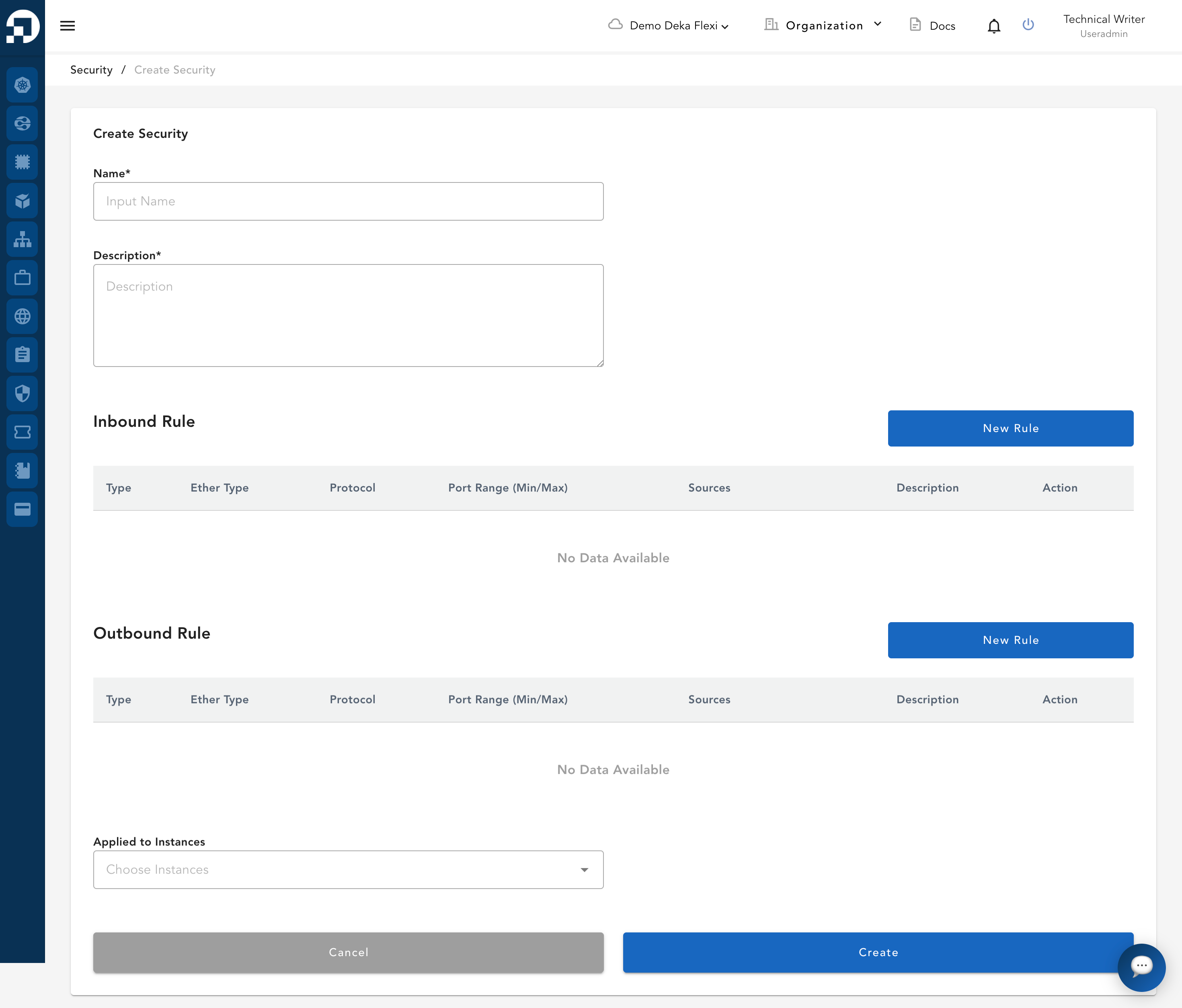
* To create a new Security Firewall Rule, complete the form as shown below.

<figure><img src="https://content.gitbook.com/content/dRGHNSPw8ps5rkLJZT3A/blobs/j5pju7RiFeWm3GFyYK41/image.png" alt=""><figcaption></figcaption></figure>

* The following table describes each field in the Create Security form.

<table><thead><tr><th width="220">Column</th><th>Description</th></tr></thead><tbody><tr><td><strong>Name</strong></td><td>Name of your security.</td></tr><tr><td><strong>Description</strong></td><td>Description of the security configuration.</td></tr><tr><td><strong>Inbound Rule</strong></td><td>Define the traffic allowed to the instance on which ports and from which sources.</td></tr><tr><td><strong>Outbound Rule</strong></td><td>Define the traffic allowed to leave the instance on which ports and to which destinations.</td></tr><tr><td><strong>Applied to Instances</strong></td><td>Select the instances to which this security rule will be applied.</td></tr></tbody></table>

* After reviewing the field descriptions above, follow the steps below to create a Security Firewall Rule.
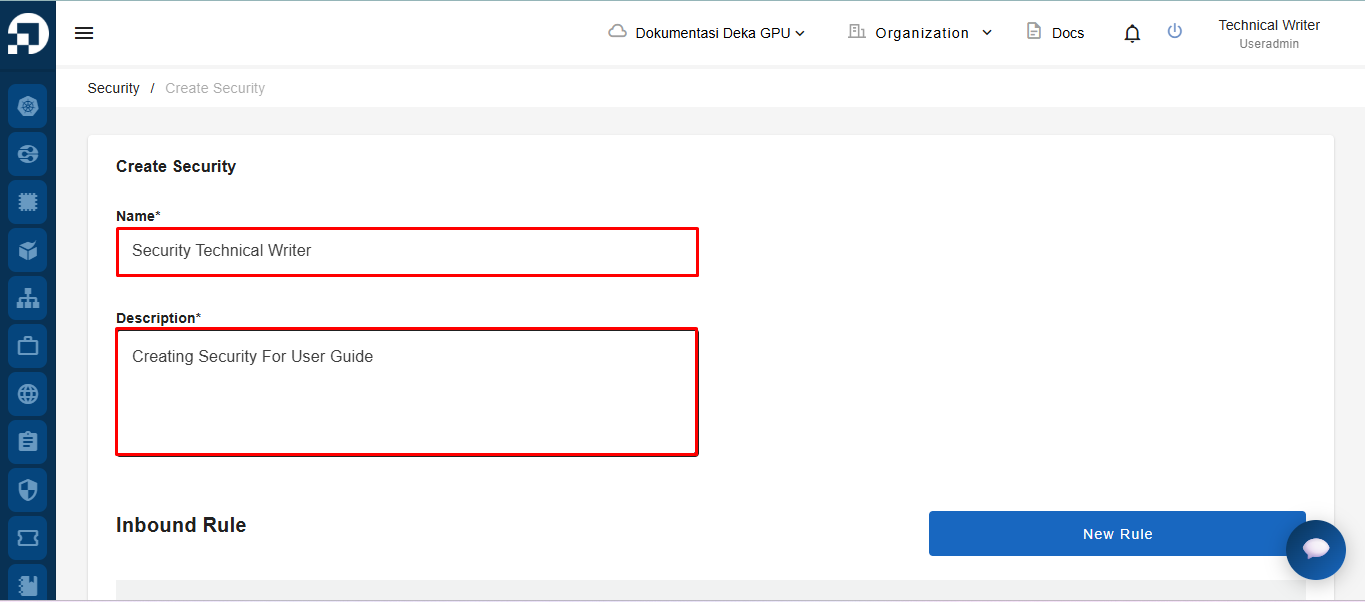
* Fill in the Create Security form by entering the name of the security configuration in the **Name** field and entering the description in the **Description** field.

<figure><img src="https://content.gitbook.com/content/dRGHNSPw8ps5rkLJZT3A/blobs/8wojSahYU42qkklRZw5g/image.png" alt=""><figcaption></figcaption></figure>

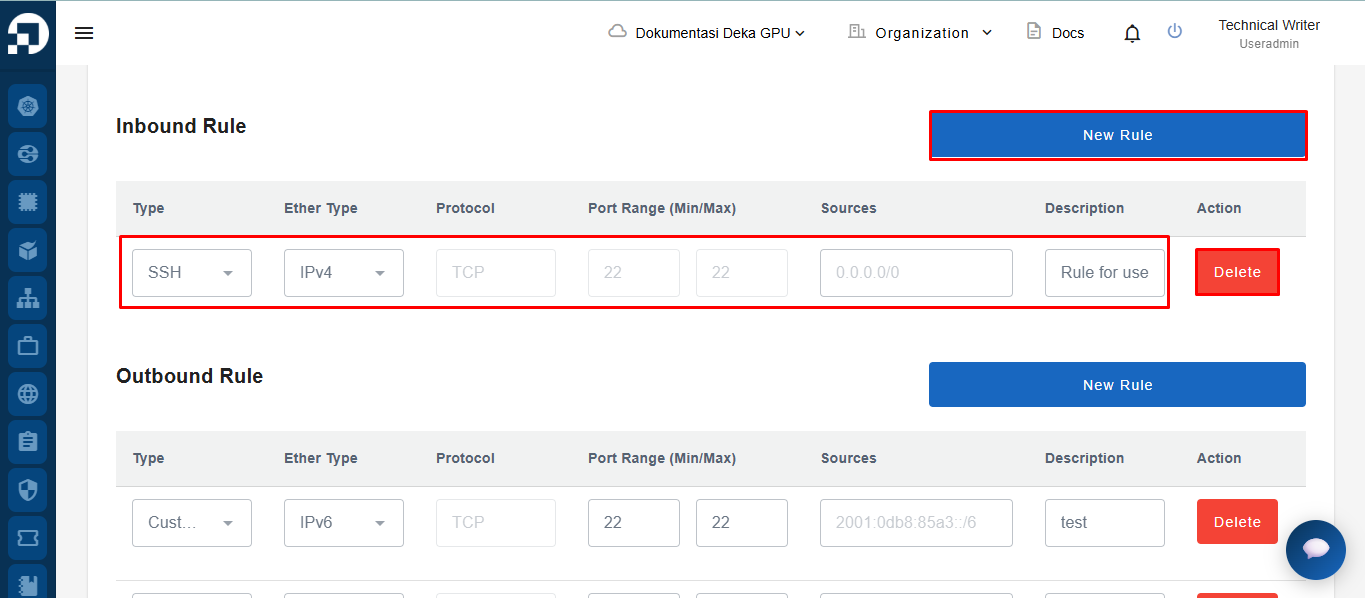
* In the **Inbound Rule** section, click the **New Rule** button to add a new rule, define the required rule parameters in the available fields, and click the **Delete** button if you want to remove an existing inbound rule.

<figure><img src="https://content.gitbook.com/content/dRGHNSPw8ps5rkLJZT3A/blobs/Sw1txlhGTsSPYY3RFLf3/image.png" alt=""><figcaption></figcaption></figure>

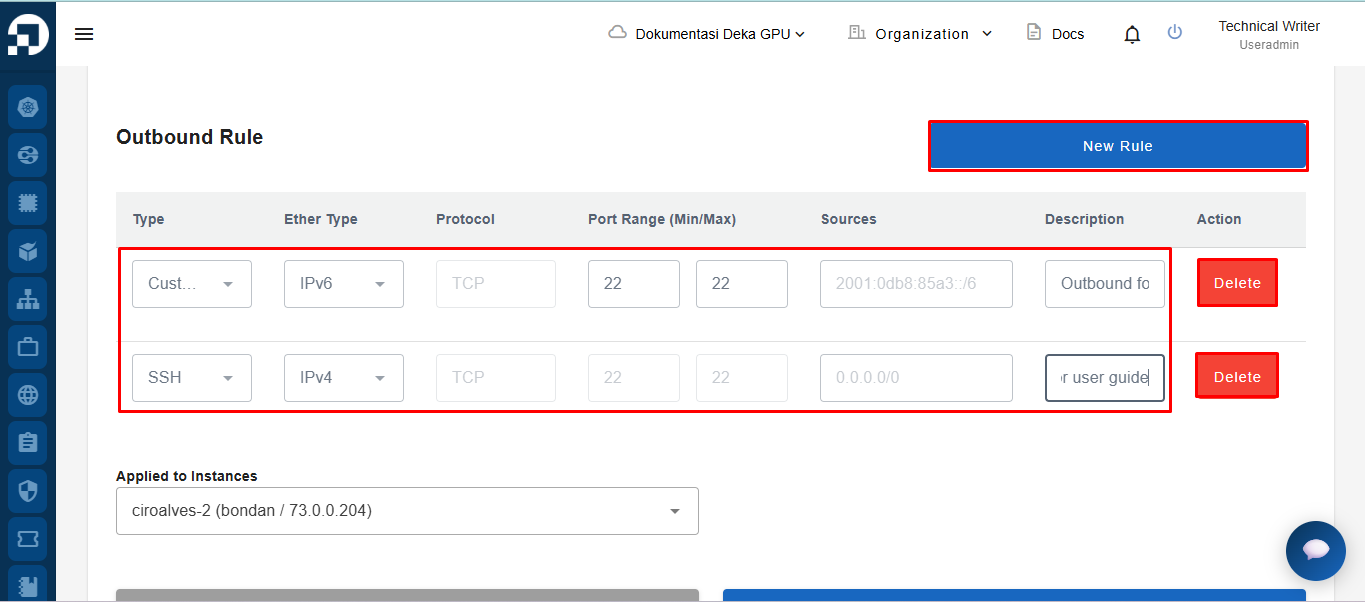
* In the **Outbound Rule** section, click the **New Rule** button to add a new rule, define the required rule parameters in the available fields, and click the **Delete** button if you want to remove an existing outbound rule.

<figure><img src="https://content.gitbook.com/content/dRGHNSPw8ps5rkLJZT3A/blobs/4LLij1ZcduMohOd8MCjH/image.png" alt=""><figcaption></figcaption></figure>

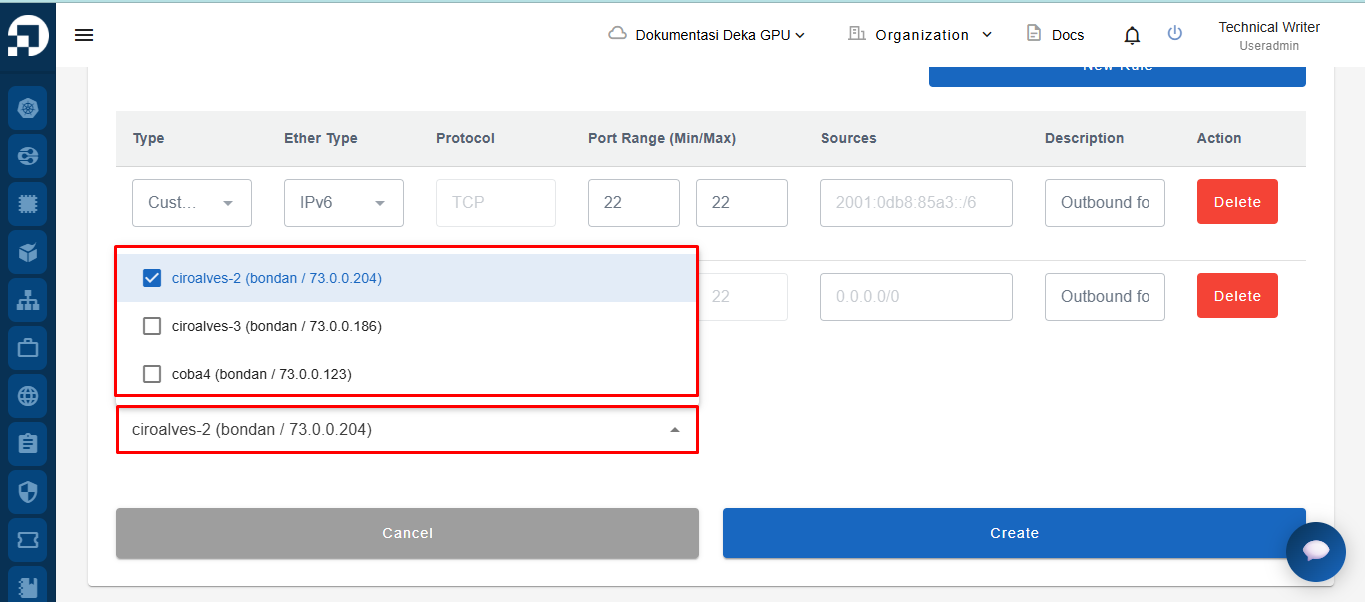
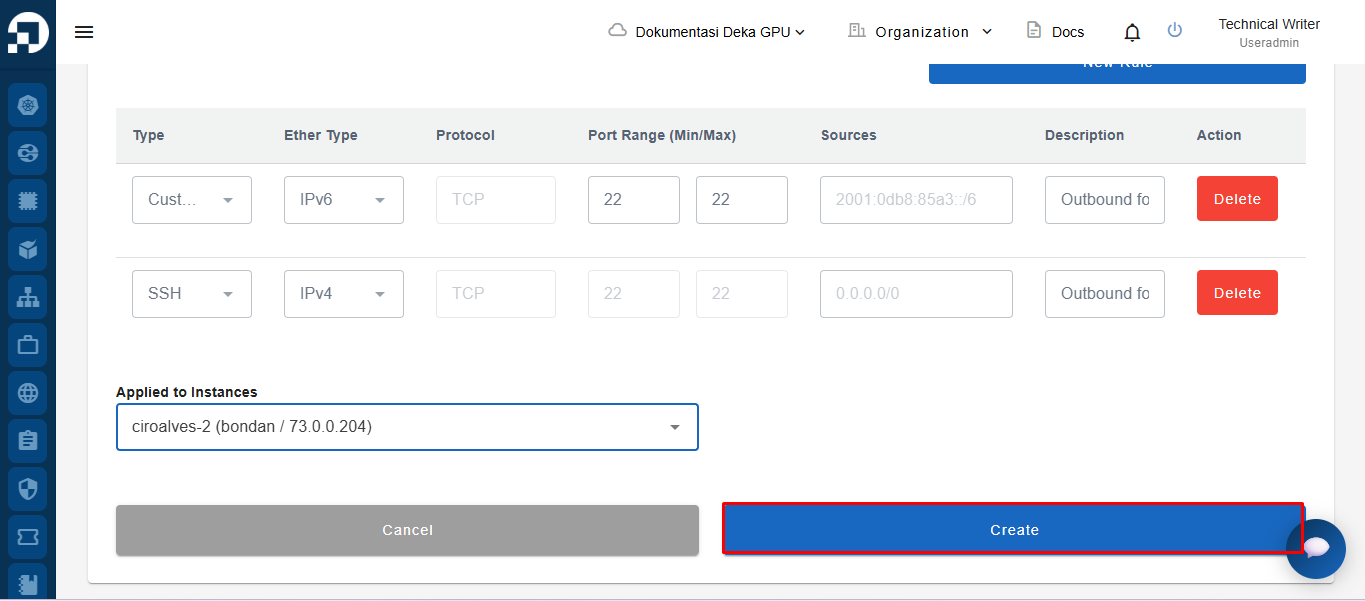
* Select the instance in the **Applied to Instances** field where the security configuration will be applied.

<figure><img src="https://content.gitbook.com/content/dRGHNSPw8ps5rkLJZT3A/blobs/j0C9FIBj35KaffEvNkn4/image.png" alt=""><figcaption></figcaption></figure>

* Click the **Create** button to save the security configuration, or click the **Cancel** button if you do not want to continue the process.&#x20;

<figure><img src="https://content.gitbook.com/content/dRGHNSPw8ps5rkLJZT3A/blobs/NvOssTZJTYb7lLu4SAgO/image.png" alt=""><figcaption></figcaption></figure>

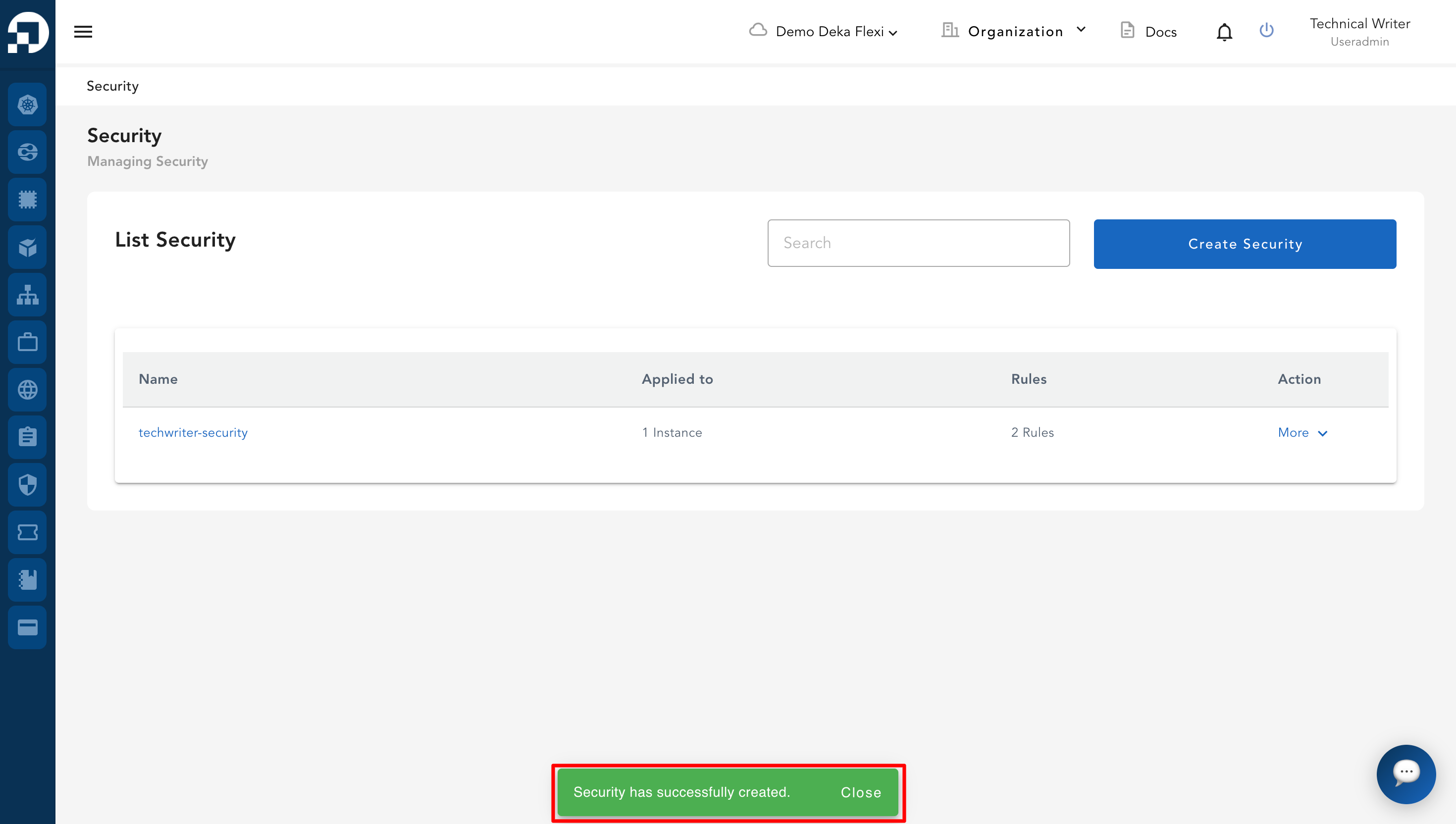
* A notification will appear displaying the message "**Security has successfully created**".

<figure><img src="https://content.gitbook.com/content/dRGHNSPw8ps5rkLJZT3A/blobs/iecDGgit290sxbH3KJn4/image.png" alt=""><figcaption></figcaption></figure>