# detail

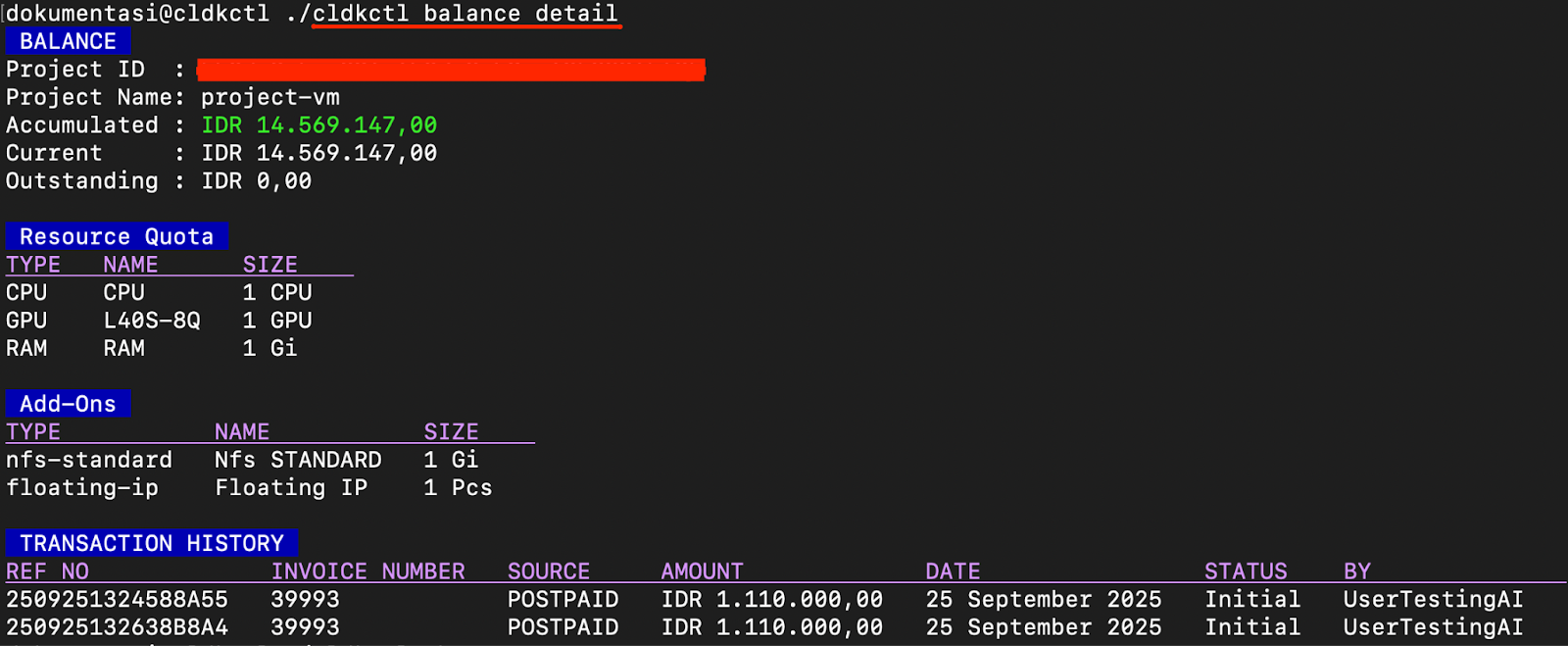
The balance detail command displays detailed balance and billing information for a specific project in Cloudeka. This includes accumulated balance, resource quota, add-ons, and transaction history.

## Usage

{% hint style="success" %}
Ensure you have authenticated using cldkctl auth before running this command.
{% endhint %}

```
cldkctl balance detail [project-id] [flags]
```

## Steps&#x20;

Follow the steps below to run and view the result of this command:

1. Run the following command in your terminal.

```
cldkctl balance detail
```

2. The terminal will display the project’s billing information, including balance, resource quota, add-ons, and transaction history.

<figure><img src="/files/AWHBtBXVfeskxFZ750nZ" alt=""><figcaption></figcaption></figure>

<table><thead><tr><th width="331.33331298828125">Column</th><th>Description</th></tr></thead><tbody><tr><td>Balance: Project ID</td><td>Unique identifier of the project.</td></tr><tr><td>Balance: Project Name</td><td>Name of the project associated with the balance.</td></tr><tr><td>Balance: Accumulated</td><td>Total accumulated cost of the project.</td></tr><tr><td>Balance: Current</td><td>The current billed amount.</td></tr><tr><td>Balance: Outstanding</td><td>Amount that remains unpaid or pending.</td></tr><tr><td>Resource Quota: Type</td><td>Type of resource (CPU, GPU, RAM).</td></tr><tr><td>Resource Quota: Name</td><td>Identifier of the resource.</td></tr><tr><td>Resource Quota: Size</td><td>Amount or capacity of each allocated resource.</td></tr><tr><td>Add Ons: Type</td><td>Add-on type (e.g., NFS, Floating IP).</td></tr><tr><td>Add Ons: Name</td><td>Add-on name.</td></tr><tr><td>Add Ons: Size</td><td>Quantity or size of the add-on used</td></tr><tr><td>Transaction History: Ref No</td><td>Unique transaction reference number.</td></tr><tr><td>Transaction History: Invoice Number</td><td>ID of the invoice.</td></tr><tr><td>Transaction History: Source</td><td>Payment type (e.g., POSTPAID).</td></tr><tr><td>Transaction History: Amount</td><td>Transaction amount in IDR.</td></tr><tr><td>Transaction History: Date</td><td>Transaction date.</td></tr><tr><td>Transaction History: Status</td><td>Transaction status (e.g., Initial, Completed).</td></tr><tr><td>Transaction History: By</td><td>Username or account that executed the transaction</td></tr></tbody></table>

## Flags

<table><thead><tr><th width="243.3333740234375">Flag</th><th>Description</th></tr></thead><tbody><tr><td>-h, --help</td><td>Help for the balance detail subcommand.</td></tr></tbody></table>

{% hint style="success" %}
This command supports [Global Flags ](/cloudeka-api-list/global-flags.md)section.
{% endhint %}


---

# Agent Instructions: Querying This Documentation

If you need additional information that is not directly available in this page, you can query the documentation dynamically by asking a question.

Perform an HTTP GET request on the current page URL with the `ask` query parameter:

```
GET https://docs.cloudeka.ai/cloudeka-api-list/command-reference/cldkctl-balance/detail.md?ask=<question>
```

The question should be specific, self-contained, and written in natural language.
The response will contain a direct answer to the question and relevant excerpts and sources from the documentation.

Use this mechanism when the answer is not explicitly present in the current page, you need clarification or additional context, or you want to retrieve related documentation sections.